Lifecycle Management
Lifecycle Management
Section titled “Lifecycle Management”The “Lifecycle” of a certificate refers to the stages it goes through from creation to deletion. SSL-CLM automates every stage of this journey.
1. Discovery (The “Unknown”)
Section titled “1. Discovery (The “Unknown”)”Before you can manage a certificate, you must find it.
- Active Scanning: The SSL-CLM Agent probes your network (IP Ranges, Subnets) on ports 443, 8443, etc., to find listening services and download their certificates.
- Passive Sync: We connect to CAs (DigiCert, MSCA) to download a list of everything they have ever issued to you.
Result: A consolidated Inventory.
2. Request & Issuance (The “Birth”)
Section titled “2. Request & Issuance (The “Birth”)”When you need a new certificate:
- Request: Users fill out a form in the UI or use the API.
- Approval: If the request violates policy (e.g., “Validity > 398 days”), it might require manual Admin approval.
- Issuance: The CSR is sent to the backing CA (e.g., DigiCert). The CA signs it and returns the certificate.
3. Installation / Provisioning (The “Deployment”)
Section titled “3. Installation / Provisioning (The “Deployment”)”A certificate sitting in a database is useless. It must be installed on a server.
- Push: SSL-CLM connects to the target (F5 ViPR, NetScaler, IIS) and pushes the new certificate.
- Binding: We update the configuration to “bind” the new certificate to the specific port (443).
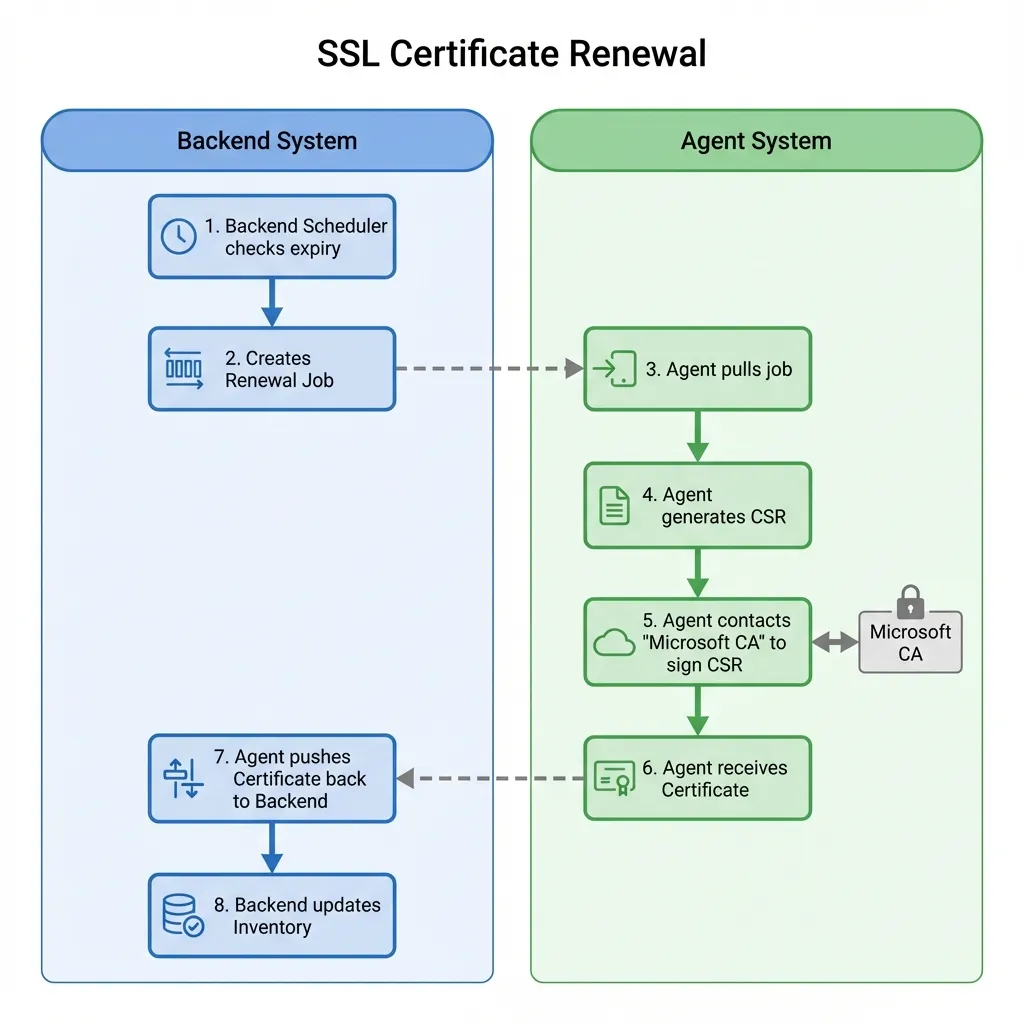
4. Renewal (The “Rebirth”)
Section titled “4. Renewal (The “Rebirth”)”Certificates have a short lifespan (currently 398 days max for public trust).
- Window: By default, SSL-CLM attempts renewal 30 days before expiry.
- Automation: If the certificate was originally installed by SSL-CLM, renewal is fully automated. The system generates a new key pair, gets it signed, and replaces the old one.
5. Revocation (The “Death”)
Section titled “5. Revocation (The “Death”)”If a private key is compromised, or a server is decommissioned, the certificate must be revoked.
- Action: Clicking “Revoke” in the UI sends a request to the CA.
- CRL/OCSP: The CA adds the serial number to its Certificate Revocation List (CRL). Browsers will now reject this certificate.
Note: Revocation is irreversible.