Architecture
CBOM is a three-tier system: distributed Sensors discover cryptographic assets, a central API ingests and manages them, and a Web UI provides visualization and management.
System Diagram
Section titled “System Diagram”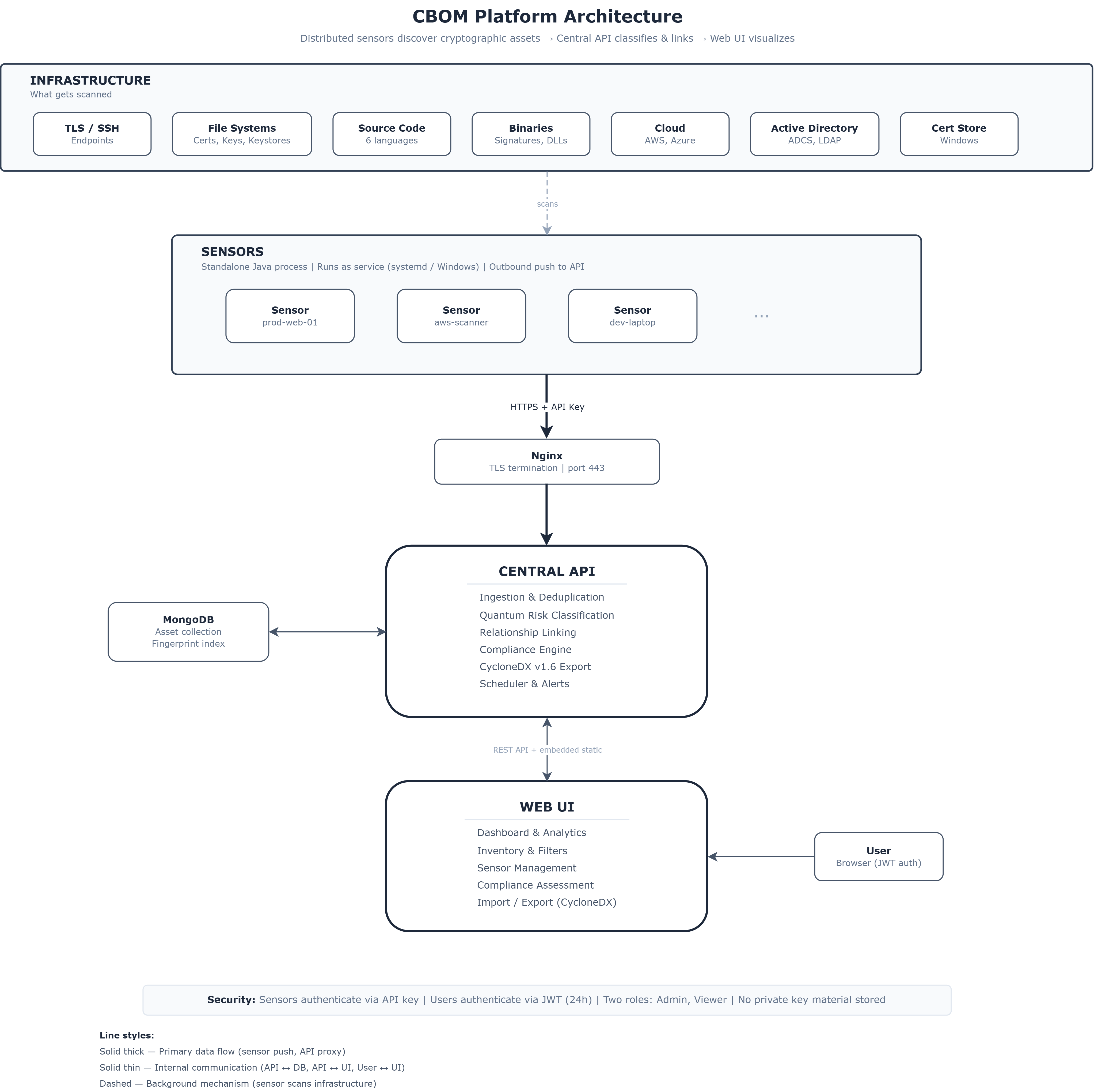
Components
Section titled “Components”Sensors
Section titled “Sensors”Standalone Java applications deployed near the infrastructure they scan. Each sensor:
- Runs as a background service (systemd on Linux, Windows Service on Windows)
- Checks in with the central API on a configurable heartbeat interval
- Receives scanner assignments dynamically (no local reconfiguration needed)
- Executes scans according to schedule (hourly, daily, weekly, or custom)
- Pushes discovered assets to the API via authenticated REST calls
A single sensor can run multiple scanner types simultaneously. Sensors require no inbound network access — they initiate all connections outward.
Central API
Section titled “Central API”The API server handles:
| Function | Description |
|---|---|
| Ingestion | Receives assets from sensors, deduplicates by fingerprint, stores in MongoDB |
| Quantum Risk | Classifies every asset’s quantum vulnerability automatically |
| Relationship Linking | Builds connections between assets (issuer chains, key pairs, keystore containment) |
| Compliance | Evaluates inventory against policy standards |
| Export | Generates CycloneDX v1.6 CBOM with full spec compliance |
| Scheduling | Manages scan schedules and distributes assignments to sensors |
| Alerts | Email notifications for policy violations and certificate expiry |
Web UI
Section titled “Web UI”Single-page application served by the API in production (single-artifact deployment). Provides:
- Real-time dashboard with quantum risk analytics and PQC readiness tracking
- Searchable inventory with type-specific filters and saved searches
- Sensor management with inline scanner assignment and configuration
- Compliance assessment with rule-based policy evaluation
- CycloneDX import/export and offline (air-gapped) import support
Database
Section titled “Database”MongoDB stores all discovered assets in a single collection, indexed by fingerprint for content-based deduplication. No cryptographic key material is stored — only metadata and fingerprints.
Data Flow
Section titled “Data Flow”
Deployment
Section titled “Deployment”CBOM deploys as a single Docker Compose stack:
Sensors → Nginx (HTTPS, port 443) → CBOM Application (API + UI) → MongoDBThe application serves the UI and API from a single process. Nginx handles TLS termination. Sensors connect outbound to the API — no inbound ports needed on sensor machines.
See Deployment Guide for full instructions.
Security Model
Section titled “Security Model”| Communication | Authentication |
|---|---|
| Sensor → API | API key (issued at registration, one per sensor) |
| UI → API | JWT token (24h expiration) |
| External → Platform | HTTPS via Nginx reverse proxy |
- Two user roles: Admin (full access) and Viewer (read-only)
- No private key material stored in the database — only metadata and fingerprints
- Secrets (JWT key, DB credentials, SMTP) managed via environment variables
Related
Section titled “Related”- Deployment — Deploy all components
- First Sensor — Register and configure sensors
- Scanner Reference — Available scanner types