Discovery
Discovery
Section titled “Discovery”Discovery enables automated identification of SSL/TLS certificates across your infrastructure. It detects unmanaged certificates, validates deployed assets, and reconciles inventory against live environments.
Navigation: Sidebar → Discovery
Discovery Categories
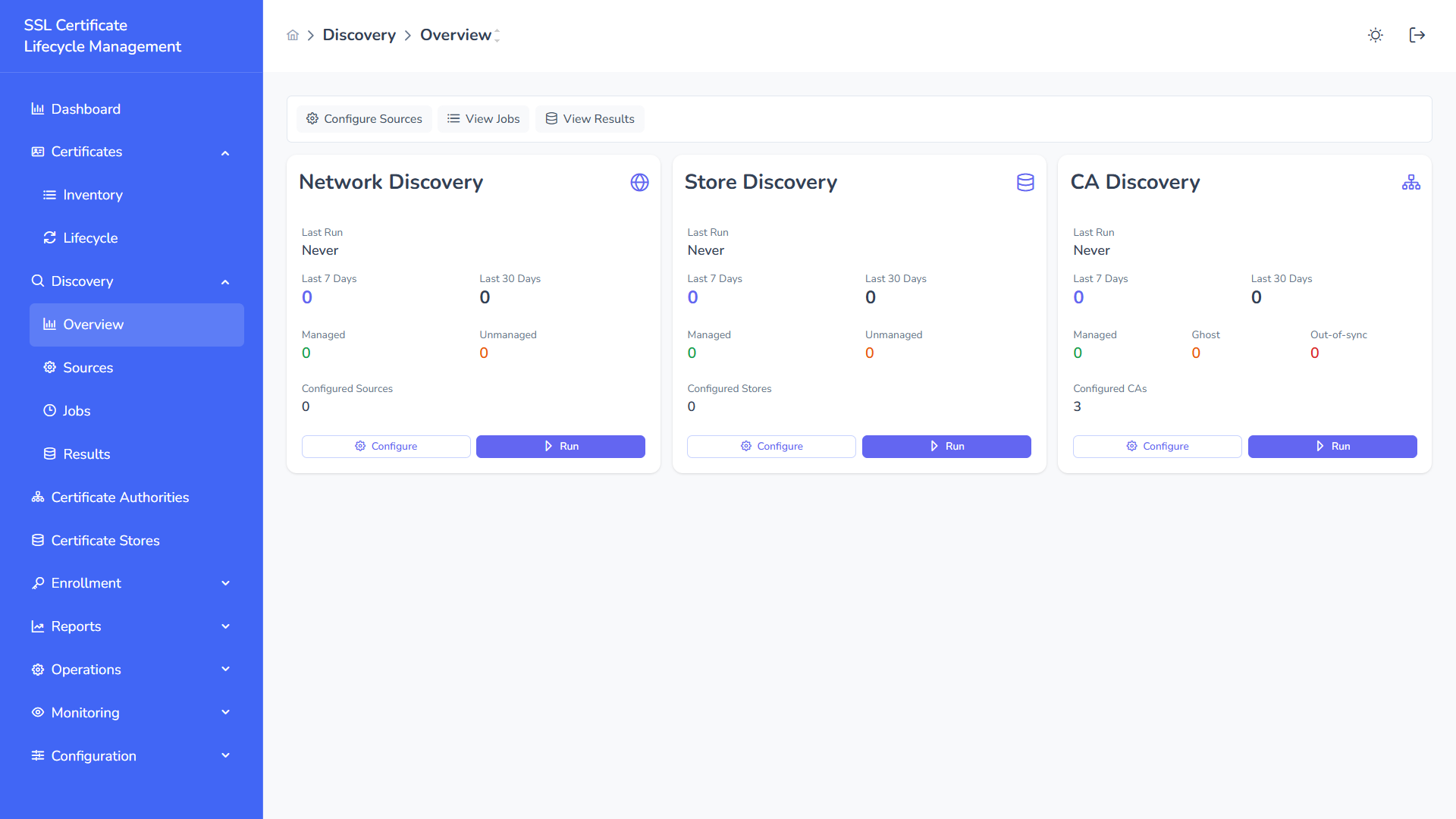
Section titled “Discovery Categories”SSL-CLM v2 supports three discovery categories, each with multiple scan methods:
| Category | Methods | Runtime |
|---|---|---|
| Network Discovery | HTTPS, IP Range, CIDR, Domain | Backend or Agent |
| Store Discovery | Single store, All stores, Cloud sync | Agent or Backend |
| CA Discovery | Single CA, All CAs | Backend or Agent |
Network Discovery
Section titled “Network Discovery”Network discovery scans infrastructure endpoints to detect exposed TLS certificates by performing TLS handshakes.
Quick Scan (Ad-Hoc)
Section titled “Quick Scan (Ad-Hoc)”The main Discovery page provides a scan input area for immediate scanning:
- Enter targets (one per line): IPs, CIDRs, domains, or URLs
- Specify the port (default:
443) - Choose execution source:
- Backend — Platform server performs the scan (for public-facing targets)
- Agent — A specific agent performs the scan (for private/internal networks)
- Click Scan Now
Results appear inline after completion.
Scan Types
Section titled “Scan Types”| Type | Input Format | Example | Use Case |
|---|---|---|---|
| HTTPS | URLs or IP:PORT | https://example.com, 192.168.1.10:8443 | Public endpoints, API servers |
| IP Range | Start IP – End IP + ports | 192.168.1.1 – 192.168.1.254, port 443 | Internal network sweeps |
| CIDR | CIDR notation + ports | 10.0.0.0/24, port 443,8443 | Subnet-level scanning |
| Domain | Domain names + ports | example.com, *.internal.corp | DNS-based discovery |
Network Scope
Section titled “Network Scope”- PUBLIC — Targets accessible from the internet; scanned from the backend
- PRIVATE — Targets on internal networks; requires agent selection for scanning
Saved Scans
Section titled “Saved Scans”Create reusable, named scans with scheduling:
Creating a Saved Scan
Section titled “Creating a Saved Scan”- Click + New Scan
- Configure:
- Name — Descriptive identifier (e.g., “Production Web Servers”)
- Targets — List of IPs, CIDRs, or domains
- Port — Target port(s)
- Run From — Backend or specific Agent
- Schedule — Manual, or cron expression for automated execution
Saved Scans Table
Section titled “Saved Scans Table”| Column | Description |
|---|---|
| Name | Scan identifier |
| Targets | Configured domains/IPs (truncated preview) |
| Run From | Backend or Agent name |
| Schedule | Manual or cron schedule |
| Last Run | Timestamp with status badge (SUCCESS / FAILED) |
| Found | Total certificates discovered in last run |
| New | Newly discovered certificates since previous run |
| Actions | Run (play icon), Edit, Delete |
Running a Saved Scan
Section titled “Running a Saved Scan”- Click the play icon (▶) on any saved scan row to trigger an immediate execution
- Scheduled scans run automatically per their cron configuration
- Results are correlated against existing inventory
Store Discovery
Section titled “Store Discovery”Scan configured certificate stores to find certificates deployed locally.
Single Store Discovery
Section titled “Single Store Discovery”- Select a specific certificate store
- The agent (or backend for agentless stores) scans the store
- Found certificates are compared against inventory
All Stores Discovery
Section titled “All Stores Discovery”Trigger discovery across all configured stores simultaneously.
Cloud Store Sync
Section titled “Cloud Store Sync”For cloud-based stores (AWS ACM, Azure Key Vault), synchronize the platform inventory with what’s actually deployed in the cloud service.
CA Discovery
Section titled “CA Discovery”Retrieve certificates directly from configured Certificate Authorities to reconcile issued vs. deployed certificates.
Single CA Discovery
Section titled “Single CA Discovery”- Select a specific CA
- Platform queries the CA for all issued certificates
- Results identify:
- Managed — Already in inventory and managed
- Ghost — Issued by the CA but not in inventory
- Out-of-Sync — In inventory but metadata differs from CA record
All CAs Discovery
Section titled “All CAs Discovery”Trigger inventory sync across all configured CAs simultaneously.
Discovery Results
Section titled “Discovery Results”After any scan completes, results provide:
Network Discovery Results
Section titled “Network Discovery Results”| Field | Description |
|---|---|
| Host | IP or domain that responded |
| Port | Port on which TLS was detected |
| Subject (CN) | Common Name from the certificate |
| SANs | Subject Alternative Names |
| Issuer | Certificate issuer |
| Valid From / To | Validity window |
| Days Left | Days until expiration |
| Chain Valid | Whether the full certificate chain is valid |
| Chain Length | Number of certificates in the chain |
| Is Managed | Whether this certificate is already in managed inventory |
CA Discovery Results
Section titled “CA Discovery Results”| Field | Description |
|---|---|
| Serial | Certificate serial number |
| Subject | Full subject DN |
| Status | Active / Revoked / Expired |
| Ghost | Issued by CA but not in platform inventory |
| Out-of-Sync | Metadata mismatch between CA and platform |
Correlation & Reconciliation
Section titled “Correlation & Reconciliation”The platform automatically correlates discovery results with the existing inventory:
- Match — Discovered certificate matches an inventory entry (by fingerprint)
- New / Unmanaged — Certificate found but not in inventory
- Ghost — Certificate exists in CA records but not deployed anywhere
- Out-of-Sync — Deployed certificate differs from inventory record (e.g., different validity, different SAN set)
- Missing — Certificate in inventory but not found in scan target
Importing Discovered Certificates
Section titled “Importing Discovered Certificates”From discovery results, you can import certificates into inventory:
- Select one or more discovered certificates
- Click Import
- Choose tier: Managed (active lifecycle) or Monitored (tracking only)
- Certificates are added to inventory
Execution Modes
Section titled “Execution Modes”| Mode | Behavior |
|---|---|
| Immediate | Scan runs synchronously; results displayed inline |
| Job-Based | Scan creates a background job; results available after completion |
Large scans (hundreds of targets) automatically run as jobs. Quick scans of a few targets run immediately.
Agent-Based Discovery
Section titled “Agent-Based Discovery”For scanning private networks that the backend cannot reach:
- Ensure an agent is deployed on the target network (or a jump host with access)
- When creating a scan, select the agent under Run From
- The agent executes the TLS scan locally and reports results back to the platform
This enables discovery of internal infrastructure without exposing it to the internet.
Scheduling
Section titled “Scheduling”Saved scans support cron-based scheduling:
| Example | Schedule |
|---|---|
0 0 * * 1 | Every Monday at midnight |
0 6 * * * | Every day at 6 AM |
0 0 1 * * | First of every month |
Scheduled scans run automatically and results are stored for review.
Operational Best Practices
Section titled “Operational Best Practices”- Run network discovery weekly across production infrastructure
- Enable CA discovery to detect ghost certificates
- Use store discovery after deployments to verify success
- Schedule scans during low-traffic windows
- Monitor “New” counts in saved scans to catch unauthorized certificates
- Import unmanaged certificates and promote to Managed tier for lifecycle automation
Related Pages
Section titled “Related Pages”- Certificates — Import discovered certificates
- Certificate Stores — Store-level discovery
- Certificate Authorities — CA-level discovery
- Agents — Agent-based scanning
- Jobs — Discovery job execution tracking