Certificate Authorities
Certificate Authorities
Section titled “Certificate Authorities”The Certificate Authorities page manages all CA integrations used for certificate issuance, renewal, revocation, and inventory synchronization.
Navigation: Sidebar → Infrastructure → Certificate Authorities
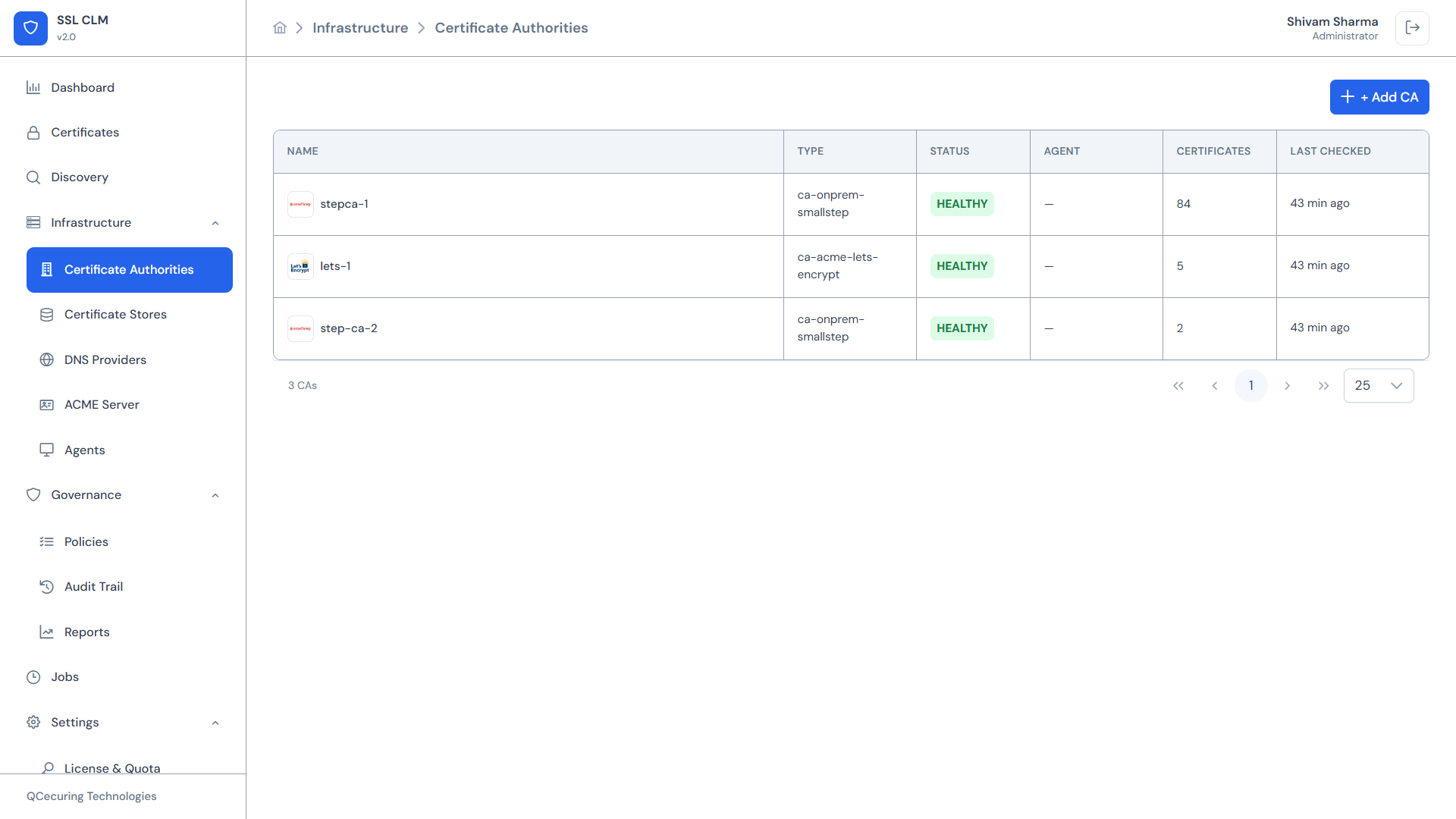
CA Inventory Table
Section titled “CA Inventory Table”The main view displays all configured CAs with:
| Column | Description |
|---|---|
| Name | Friendly name assigned during creation |
| Type | Integration type (e.g., MSCA, STEPCA, ACME) |
| Status | Health status: HEALTHY, UNHEALTHY, UNREACHABLE, DISABLED |
| Agent | Agent name (for agent-based CAs) or ”—” for direct API |
| Certificates | Total certificates issued through this CA |
| Last Checked | Timestamp of the last health check or sync |
Supported CA Types
Section titled “Supported CA Types”SSL-CLM v2 supports 6 Certificate Authority integration types:
Microsoft CA (AD CS)
Section titled “Microsoft CA (AD CS)”| Property | Value |
|---|---|
| Type ID | MSCA |
| Runtime | Agent |
| Agent Required | Yes — must run on a domain-joined Windows server |
| Protocol | WinRM / certutil command execution |
| Features | Enrollment, renewal, revocation, template discovery |
The agent executes native certutil and certreq commands against the Microsoft CA. Templates are automatically discovered and made available for certificate issuance.
→ Microsoft AD CS Integration Guide
Smallstep Step-CA
Section titled “Smallstep Step-CA”| Property | Value |
|---|---|
| Type ID | STEPCA |
| Runtime | Backend (direct API) |
| Agent Required | No |
| Protocol | Step-CA REST API with JWK-signed tokens |
| Features | Enrollment, renewal, revocation, inventory sync |
Authenticates using a JWK provisioner private key. Communicates directly with the Step-CA API over HTTPS.
Configuration Fields:
provisionerName— JWK provisioner name (e.g.,clm@qcecuring.com)baseUrl— Step-CA API URL (e.g.,https://step-ca.internal:9000)provisionerKeyId— KID from the JWKprovisionerJwk— Full JWK private key (EC P-256)
→ Smallstep CA Integration Guide
Let’s Encrypt / ACME
Section titled “Let’s Encrypt / ACME”| Property | Value |
|---|---|
| Type ID | ACME |
| Runtime | Backend |
| Agent Required | No |
| Protocol | ACME (RFC 8555) |
| Features | Enrollment, renewal, revocation via ACME |
SSL-CLM acts as an ACME client, automating the full ACME flow (order creation, challenge completion, certificate download).
Configuration Fields:
directoryUrl— ACME directory URL (e.g.,https://acme-v02.api.letsencrypt.org/directory)accountEmail— Contact email for the ACME accounteabKid/eabHmacKey— External Account Binding credentials (if required)
Supported Challenge Types:
- HTTP-01 (requires port 80 access)
- DNS-01 (requires DNS provider integration)
- TLS-ALPN-01 (requires port 443 access)
→ ACME / Let’s Encrypt Integration Guide
| Property | Value |
|---|---|
| Type ID | EJBCA |
| Runtime | Backend |
| Agent Required | No |
| Protocol | EJBCA REST API |
| Features | Enrollment, renewal, revocation, template/profile discovery |
Integrates with EJBCA (Enterprise Java Beans Certificate Authority) via its REST API for enterprise PKI environments.
Configuration Fields:
baseUrl— EJBCA API endpointclientCertPath— Client certificate for mutual TLS authenticationclientKeyPath— Client private keycaName— Target CA name within EJBCAcertificateProfileName— Certificate profile to useendEntityProfileName— End entity profile to use
AWS Private CA (ACM PCA)
Section titled “AWS Private CA (ACM PCA)”| Property | Value |
|---|---|
| Type ID | ACMPCA |
| Runtime | Backend |
| Agent Required | No |
| Protocol | AWS SDK (ACM PCA API) |
| Features | Enrollment, renewal, revocation |
Integrates with AWS Certificate Manager Private Certificate Authority for cloud-native PKI.
Configuration Fields:
region— AWS region (e.g.,us-east-1)caArn— ARN of the Private CAaccessKeyId— AWS access keysecretAccessKey— AWS secret keysigningAlgorithm— e.g.,SHA256WITHRSAtemplateArn— (optional) ACM PCA template ARN
→ AWS Private CA Integration Guide
Google Certificate Authority Service
Section titled “Google Certificate Authority Service”| Property | Value |
|---|---|
| Type ID | GOOGLE_CAS |
| Runtime | Backend |
| Agent Required | No |
| Protocol | Google Cloud API (CAS v1) |
| Features | Enrollment, renewal, revocation |
Integrates with Google Cloud Certificate Authority Service for GCP-native PKI.
Configuration Fields:
projectId— GCP project IDlocation— Region (e.g.,us-central1)caPoolId— CA Pool identifiercaId— (optional) Specific CA within the poolserviceAccountJson— GCP service account credentials (JSON)
→ Google CAS Integration Guide
Adding a Certificate Authority
Section titled “Adding a Certificate Authority”- Click + Add CA
- Step 1 — Select Type: Choose from the 6 supported CA types displayed as cards
- Step 2 — Configure: Fill in the configuration fields (rendered dynamically based on the selected type’s schema)
- Enter a friendly name
- For agent-based CAs: select the agent from the dropdown
- For API-based CAs: enter endpoint URL and credentials
- Set discovery/refresh interval (hours) for automatic CA inventory sync
- Step 3 — Test Connection (optional): Verify connectivity before saving
- Click Save
The wizard uses dynamic config schemas loaded from /api/integration-schemas/ca/{type}, so configuration fields adapt to each CA type automatically.
CA Detail View
Section titled “CA Detail View”Click any CA row to open its detail page:
Overview
Section titled “Overview”- CA name, type, status, integration ID
- Agent assignment (if applicable)
- Discovery interval configuration
- Last sync timestamp
- Certificate count
Health Check
Section titled “Health Check”- Current status with color indicator
- Last check timestamp
- Health check history
- Error details (for UNHEALTHY/UNREACHABLE)
Templates
Section titled “Templates”For CAs that support templates (Microsoft CA, EJBCA):
- Auto-discovered template list
- Template metadata: code, name, validity, key algorithms, min key size, SAN support, wildcard support, approval requirement, EKUs
- Load Templates button to trigger fresh template discovery
Certificates
Section titled “Certificates”List of all certificates issued by this CA, with links to certificate detail views.
Actions
Section titled “Actions”- Test Connection — Verify CA reachability
- Refresh — Trigger immediate inventory sync (
CA_REFRESHjob) - Load Templates — Discover available certificate templates
- Edit — Modify configuration
- Disable — Deactivate the CA (prevents new issuance)
- Delete — Remove the CA integration
CA Health Statuses
Section titled “CA Health Statuses”| Status | Meaning | Action Required |
|---|---|---|
| HEALTHY | CA reachable, credentials valid, API responding | None |
| UNHEALTHY | CA reachable but returning errors | Check credentials, CA service health |
| UNREACHABLE | Network timeout or connection refused | Check network, firewall, agent status |
| DISABLED | Manually disabled by administrator | Re-enable when ready |
Template Discovery
Section titled “Template Discovery”For template-based CAs, SSL-CLM automatically discovers available certificate templates:
Microsoft CA Templates
Section titled “Microsoft CA Templates”Discovered via certutil -catemplates through the agent:
- Template display name and OID
- Key algorithm requirements
- Validity period
- Whether manual approval is required
EJBCA Profiles
Section titled “EJBCA Profiles”Discovered via the EJBCA REST API:
- Certificate profiles
- End entity profiles
- Key constraints
Templates appear in the enrollment workflow when a user selects the CA.
CA Inventory Synchronization
Section titled “CA Inventory Synchronization”SSL-CLM periodically syncs with each CA based on the configured Refresh Interval:
- Platform dispatches a
CA_REFRESHjob - Agent (or backend) queries the CA for all issued certificates
- Results are compared against platform inventory
- New certificates are flagged
- Revoked or expired certificates are updated
Default refresh interval: 24 hours. Can be set from 1 hour to 168 hours (7 days).
Related Pages
Section titled “Related Pages”- CA Capability Matrix — Feature comparison across CA types
- Microsoft AD CS Integration — Step-by-step setup
- Smallstep CA Integration — Step-by-step setup
- ACME / Let’s Encrypt — ACME client configuration
- Agents — Required for agent-based CAs