Renewals
Certificate Renewals
Section titled “Certificate Renewals”SSL CLM provides centralized visibility into certificate expiration and streamlined renewal execution.
Renewal Dashboard
Section titled “Renewal Dashboard”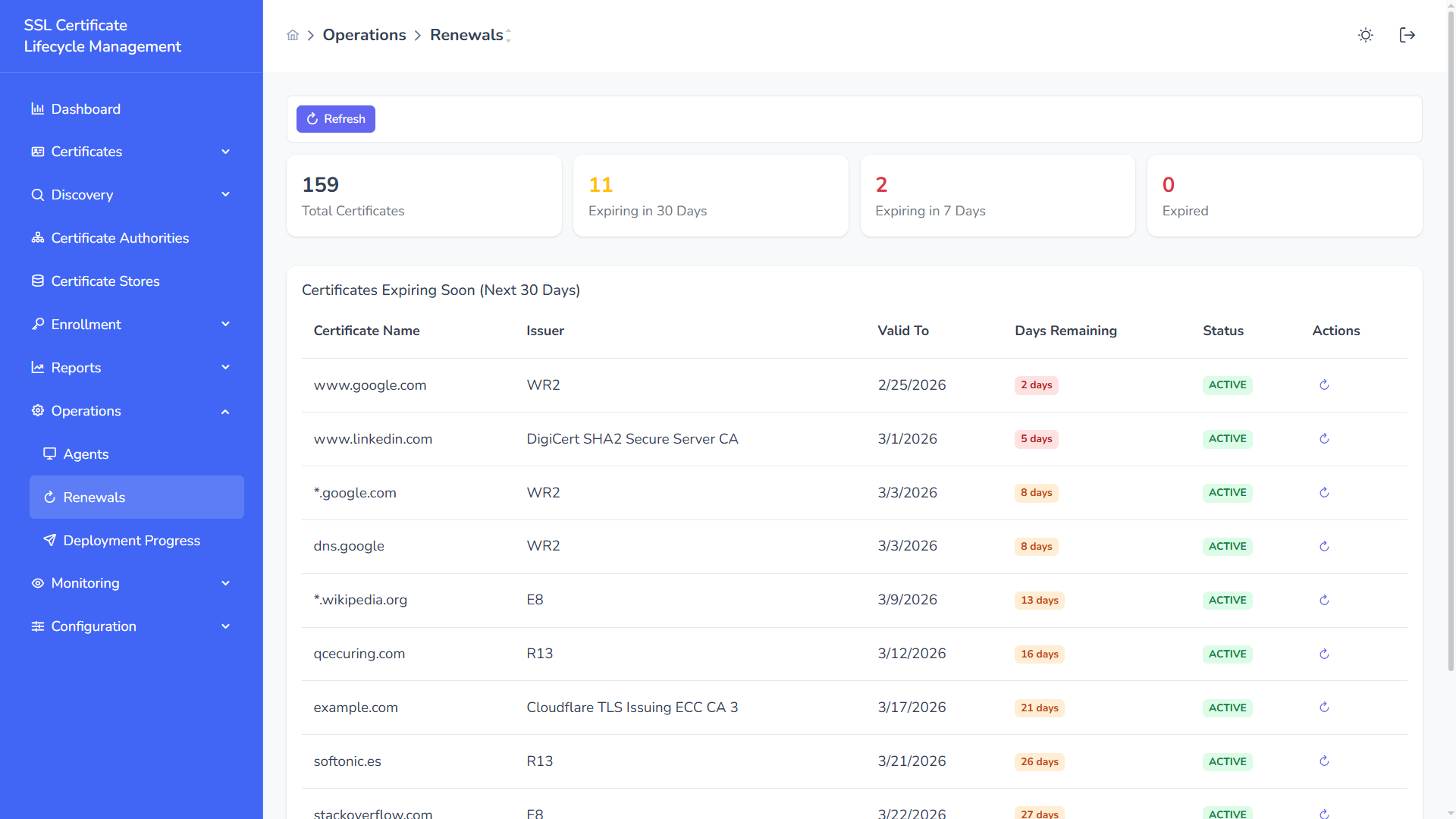
The renewal dashboard provides real-time expiration intelligence across your certificate inventory.
Summary Metrics
Section titled “Summary Metrics”At the top of the page:
- Total Certificates
- Expiring in 30 Days
- Expiring in 7 Days
- Expired Certificates
These indicators allow teams to prioritize high-risk certificates immediately.
Certificates Expiring Soon
Section titled “Certificates Expiring Soon”The system automatically lists certificates that will expire within the next 30 days.
Displayed information includes:
- Certificate Name
- Issuer
- Expiration Date (Valid To)
- Days Remaining
- Current Status
- Renewal Action
Color-coded day indicators help identify urgency:
- Red → Critical (≤ 7 days)
- Orange → Warning
- Normal → Upcoming
Manual Renewal Trigger
Section titled “Manual Renewal Trigger”From the Actions column, administrators can:
- Initiate certificate renewal
- Redirect to enrollment workflow
- Replace expiring certificates before service disruption
Automated Renewal Logic
Section titled “Automated Renewal Logic”SSL CLM supports automated renewal policies:
- Default renewal window (e.g., 30 days before expiration)
- Configurable renewal thresholds
- Retry logic on failure
- Renewal event tracking
Renewal Governance
Section titled “Renewal Governance”- Full audit traceability
- CA-based renewal routing
- Template-based renewal (if supported by CA)
- Renewal history tracking
Proactive renewal monitoring prevents service outages and ensures continuous TLS availability across environments.