Certificate Stores
Certificate Stores
Section titled “Certificate Stores”Certificate Stores represent deployment targets where certificates and keys are installed, bound to services, validated, and monitored.
Navigation: Sidebar → Infrastructure → Certificate Stores
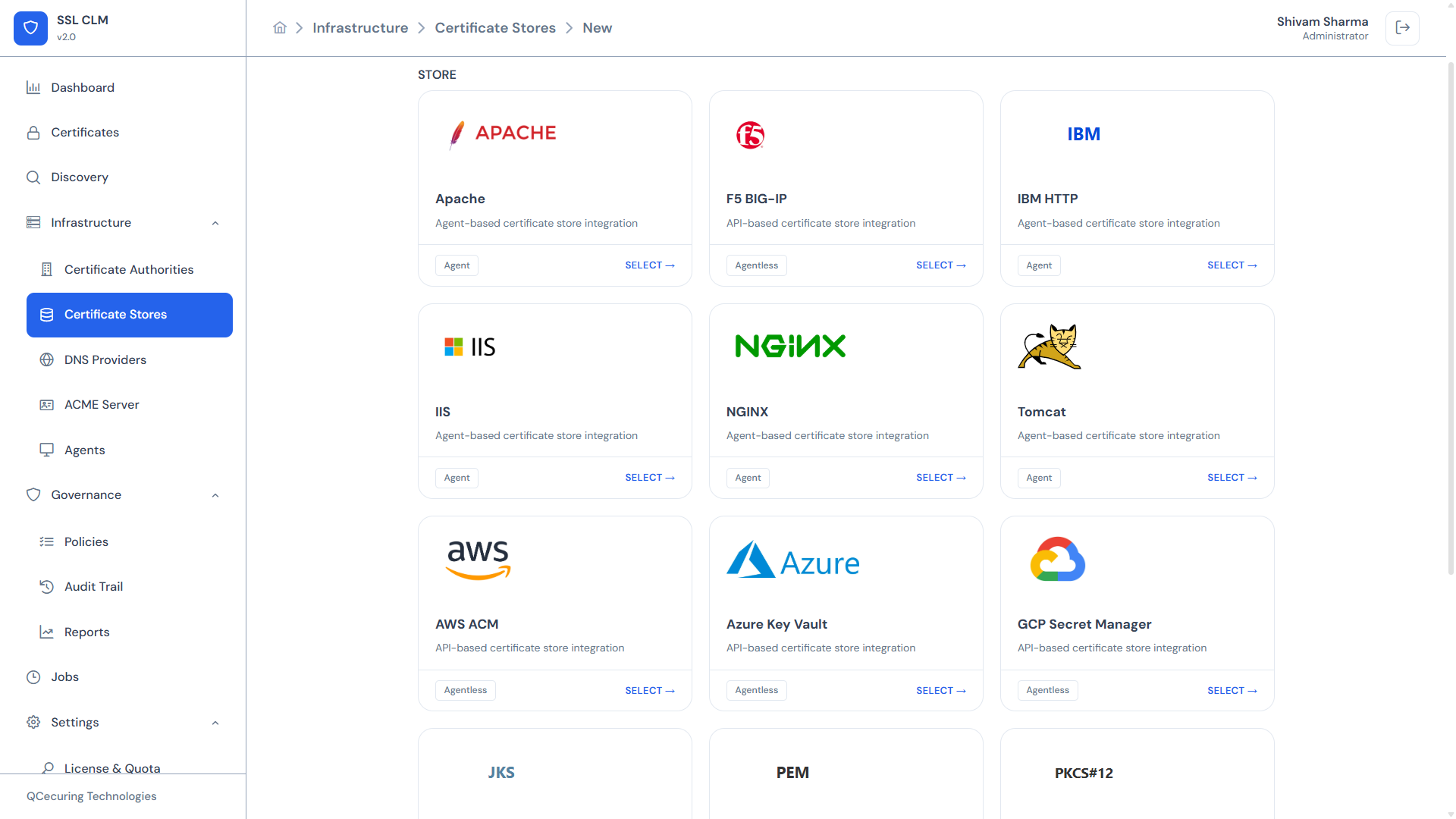
Store Inventory Table
Section titled “Store Inventory Table”The main view displays all configured stores:
| Column | Description |
|---|---|
| Name | Friendly name assigned during creation |
| Type | Store integration type (e.g., NGINX, IIS, AWS ACM) |
| Category | File-Based, Application Server, or Cloud |
| Agent | Agent name (for agent-based stores) or ”—” for agentless |
| Certificates | Number of certificates deployed to this store |
| Status | Connected / Disconnected / Error |
| Last Sync | Last time the store was inventoried |
Supported Store Types
Section titled “Supported Store Types”SSL-CLM v2 supports 7 certificate store types organized into 3 categories:
File-Based Stores
Section titled “File-Based Stores”| Store | Type ID | Runtime | Agent | Certificate Format |
|---|---|---|---|---|
| NGINX | store-filebased-nginx | Agent | Required | PEM (cert + key + chain as separate files) |
| JKS | store-filebased-jks | Agent | Required | Java Keystore (JKS / PKCS#12) |
NGINX stores deploy certificates as PEM files to configured paths and execute a reload command (nginx -t && systemctl reload nginx).
JKS stores import certificates into Java Keystores using keytool or direct PKCS#12 operations.
Application Server Stores
Section titled “Application Server Stores”| Store | Type ID | Runtime | Agent | Certificate Format |
|---|---|---|---|---|
| Apache | store-applicationserver-apache | Agent | Required | PEM (cert + key + chain) |
| IIS | store-applicationserver-iis | Agent | Required | PFX / PKCS#12 |
| F5 BIG-IP | store-applicationserver-f5bigip | Backend | — | PEM or PKCS#12 via iControl REST |
Apache stores deploy PEM files and reload Apache (apachectl configtest && systemctl reload apache2).
IIS stores import certificates into the Windows Certificate Store and bind them to IIS sites.
F5 BIG-IP stores use the iControl REST API to upload certificates and keys, then bind them to SSL profiles. No agent required.
Cloud Stores
Section titled “Cloud Stores”| Store | Type ID | Runtime | Agent | Certificate Format |
|---|---|---|---|---|
| AWS ACM | store-cloud-aws-acm | Backend | — | PEM (cert + chain + key) |
| Azure Key Vault | store-cloud-azure-keyvault-secret | Backend | — | PEM or PFX |
AWS ACM stores use the AWS SDK to import certificates into AWS Certificate Manager for use with ELB, CloudFront, API Gateway, etc.
Azure Key Vault stores use the Azure SDK to import certificates as Key Vault secrets/certificates.
Agent vs. Agentless
Section titled “Agent vs. Agentless”| Mode | How It Works | When to Use |
|---|---|---|
| Agent-based | SSL-CLM Agent installed on the target host executes deployment locally | On-premise servers, VMs, containers without API access |
| Agentless | Platform connects directly via API (REST, SDK) | Cloud services, load balancers with management APIs |
For agent-based stores, the agent must be registered and ONLINE. The platform dispatches a DEPLOY_CERT job to the agent, which executes locally.
For agentless stores, the platform backend makes direct API calls to the target service.
Adding a Certificate Store
Section titled “Adding a Certificate Store”- Click + Add Store
- Step 1 — Select Type: Store types are displayed as cards organized by category
- Browse File-Based, Application Server, and Cloud categories
- Click the desired store type card
- Step 2 — Configure: Fill in the configuration form
- Name — Friendly identifier for this store instance
- Agent — Select from registered agents (for agent-based stores)
- Type-specific fields rendered dynamically from the integration schema
Configuration Fields by Type
Section titled “Configuration Fields by Type”| Field | Description | Example |
|---|---|---|
certPath | Path to write certificate PEM | /etc/nginx/ssl/cert.pem |
keyPath | Path to write private key PEM | /etc/nginx/ssl/key.pem |
chainPath | Path to write CA chain PEM | /etc/nginx/ssl/chain.pem |
reloadCommand | Command to reload NGINX | nginx -t && systemctl reload nginx |
Apache
Section titled “Apache”| Field | Description | Example |
|---|---|---|
certPath | Path to certificate file | /etc/ssl/certs/server.pem |
keyPath | Path to private key file | /etc/ssl/private/server.key |
chainPath | Path to chain file | /etc/ssl/certs/chain.pem |
reloadCommand | Command to reload Apache | apachectl configtest && systemctl reload apache2 |
| Field | Description | Example |
|---|---|---|
siteName | IIS site name to bind | Default Web Site |
storeName | Windows certificate store | WebHosting |
bindingIp | IP for the binding | * |
bindingPort | Port for the binding | 443 |
bindingHostname | SNI hostname (optional) | example.com |
F5 BIG-IP
Section titled “F5 BIG-IP”| Field | Description | Example |
|---|---|---|
host | F5 management IP/hostname | f5.internal.corp |
port | Management port | 443 |
username | API username | admin |
password | API password | (stored encrypted) |
partition | BIG-IP partition | Common |
sslProfile | SSL profile name | /Common/clientssl |
| Field | Description | Example |
|---|---|---|
keystorePath | Path to the keystore file | /opt/app/conf/keystore.jks |
keystorePassword | Keystore password | (stored encrypted) |
alias | Key alias within the keystore | server |
keystoreType | JKS or PKCS12 | JKS |
AWS ACM
Section titled “AWS ACM”| Field | Description | Example |
|---|---|---|
region | AWS region | us-east-1 |
accessKeyId | AWS access key ID | AKIA... |
secretAccessKey | AWS secret access key | (stored encrypted) |
certificateArn | Existing ACM cert ARN (for updates) | arn:aws:acm:... |
Azure Key Vault
Section titled “Azure Key Vault”| Field | Description | Example |
|---|---|---|
vaultUrl | Key Vault URL | https://myvault.vault.azure.net |
tenantId | Azure AD tenant ID | xxxxxxxx-xxxx-... |
clientId | Service principal client ID | xxxxxxxx-xxxx-... |
clientSecret | Service principal secret | (stored encrypted) |
certificateName | Name in Key Vault | my-ssl-cert |
- Click Save
Store Detail View
Section titled “Store Detail View”Click any store row to open its detail page:
Overview
Section titled “Overview”- Store name, type, category
- Agent assignment
- Certificate count
- Connection status
- Last sync time
Deployed Certificates
Section titled “Deployed Certificates”List of all certificates currently deployed in this store, with:
- Certificate name and status
- Deployment date
- Binding details (for application servers)
Actions
Section titled “Actions”| Action | Description |
|---|---|
| Deploy Certificate | Push a certificate to this store |
| Discover | Scan the store and import found certificates |
| Validate | Run validation checks (cert present, key matches, chain valid) |
| Sync to Inventory | Update inventory metadata from actual store state |
| Bind | Bind a certificate to a service endpoint |
| Backup | Create a backup of current certificate state |
| Edit | Modify store configuration |
| Delete | Remove store (does not remove certificates from the actual target) |
Deploying a Certificate
Section titled “Deploying a Certificate”From the Certificate Detail View
Section titled “From the Certificate Detail View”- Navigate to a certificate’s detail page
- Click Deploy
- Select target store(s)
- Confirm deployment
From the Store Detail View
Section titled “From the Store Detail View”- Navigate to the store detail page
- Click Deploy Certificate
- Select the certificate to deploy
- Configure binding (for application servers)
- Confirm
Deployment Flow
Section titled “Deployment Flow”- Platform creates a
DEPLOY_CERTjob - For agent-based: job is dispatched to the assigned agent
- For agentless: platform executes directly via API
- Certificate and key are written/uploaded
- Post-deploy hook executes (reload command for web servers)
- Validation runs (certificate present, key matches, service responding)
- Job status updated (SUCCESS / FAILED)
Post-Deployment Validation
Section titled “Post-Deployment Validation”After deployment, the platform automatically validates:
- Certificate file exists at the configured path
- Private key is present and matches the certificate
- Certificate chain is complete and valid
- Service is responding with the new certificate (for web servers)
- Binding is correct (for IIS, F5)
Failed validation generates an alert and marks the deployment as requiring attention.
Store Discovery
Section titled “Store Discovery”Scan a store to find what certificates are currently deployed:
- Click Discover on a store
- The agent (or backend) scans the store
- Found certificates are compared against inventory
- Unmanaged certificates can be imported
Useful for:
- Initial store onboarding
- Drift detection
- Verifying deployment state
Related Pages
Section titled “Related Pages”- Certificates — Certificate inventory and deployment
- Agents — Required for agent-based stores
- Web Server Integrations — Detailed NGINX, Apache, IIS setup
- Cloud Store Integrations — AWS ACM, Azure Key Vault details
- Jobs — Track deployment job execution