Agents
Agents
Section titled “Agents”SSL-CLM Agents are lightweight Java services deployed on remote hosts to execute certificate operations locally. They enable secure, distributed lifecycle management for infrastructure that isn’t directly API-accessible from the platform.
Navigation: Sidebar → Infrastructure → Agents
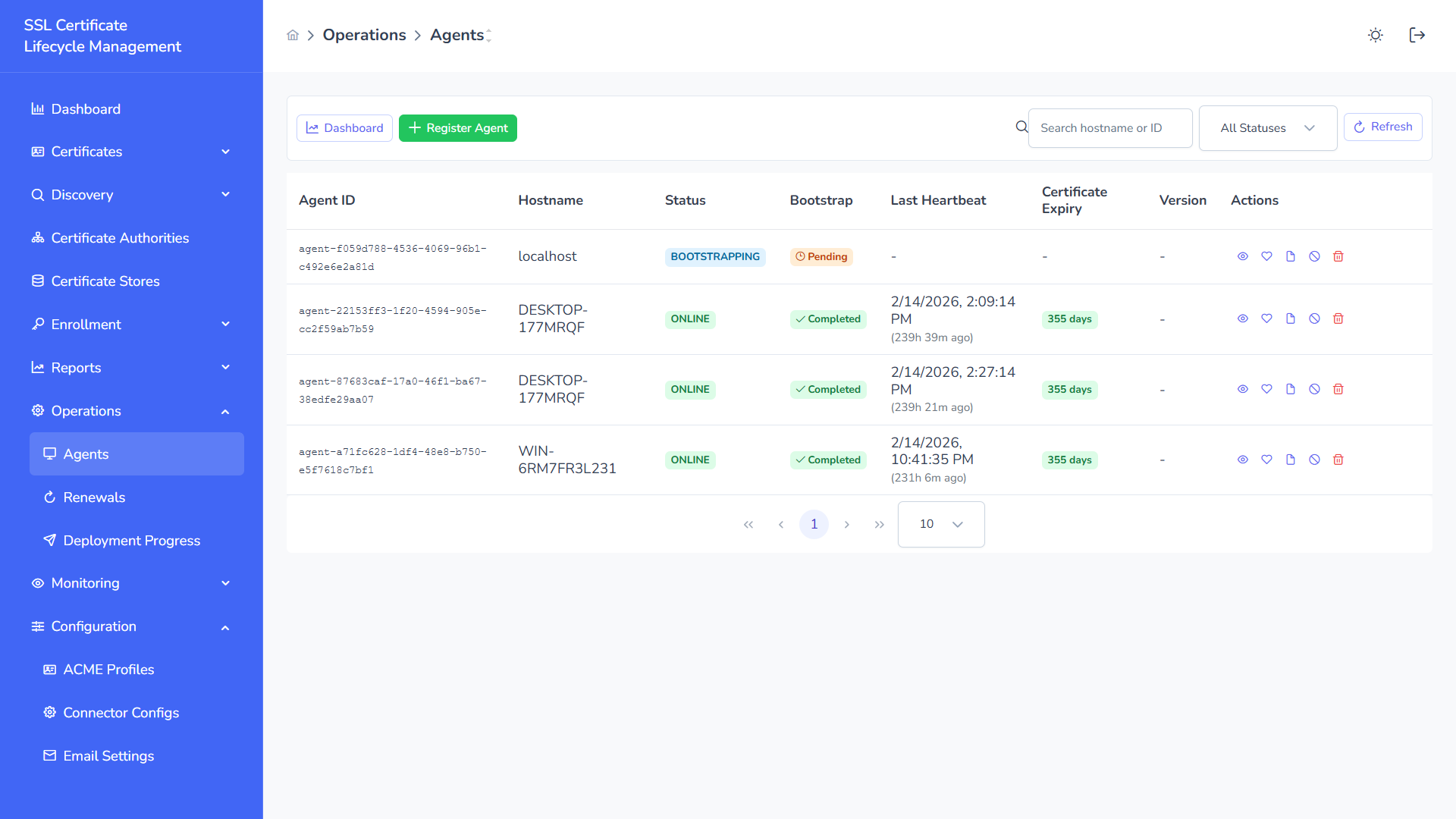
Agent List
Section titled “Agent List”The main view displays all registered agents:
| Column | Description |
|---|---|
| Name | Agent display name or label |
| Host | Hostname of the machine running the agent |
| OS | Operating system and version |
| Stores | Number of certificate stores managed by this agent |
| Status | Connection status badge |
| Last Seen | Time since last heartbeat |
| Actions | View, Disable, Delete |
Filtering
Section titled “Filtering”- Search — Filter by name or hostname
- Status Dropdown — Filter by: All Statuses, ONLINE, OFFLINE, BOOTSTRAPPING, DISABLED
Agent Statuses
Section titled “Agent Statuses”| Status | Color | Meaning |
|---|---|---|
| ONLINE | Green | Agent is connected, heartbeat active, ready to execute jobs |
| BOOTSTRAPPING | Blue | Agent recently registered, completing initial setup |
| OFFLINE | Red | No heartbeat received within timeout threshold |
| DISABLED | Gray | Manually disabled by administrator — will not receive jobs |
| EXPIRED | Red | Agent’s mTLS certificate has expired — requires re-bootstrap |
| SAFE_MODE | Orange | Restricted operation due to auth failure — fail-closed state |
Registering a New Agent
Section titled “Registering a New Agent”Step 1 — Generate Bootstrap Token
Section titled “Step 1 — Generate Bootstrap Token”- Click + Register Agent
- Enter the agent hostname
- Click Generate Token
- Copy the one-time bootstrap token
Bootstrap tokens are:
- One-time use — Consumed upon first agent registration
- Time-limited — Expire after a configurable window (default: 24 hours)
- Irrevocable — Once used, cannot be reused
Step 2 — Install Agent on Target Host
Section titled “Step 2 — Install Agent on Target Host”Download the agent JAR from the platform or obtain it from your deployment package:
ssl-clm-agent-<version>.jarSystem requirements:
- Java 21+
- Outbound HTTPS access to the SSL-CLM platform
- No inbound ports required
Step 3 — Start the Agent
Section titled “Step 3 — Start the Agent”Linux:
java -jar ssl-clm-agent.jar \ --backend.url=https://ssl-clm.example.com:8080 \ --bootstrap.token=YOUR_BOOTSTRAP_TOKENWindows (PowerShell):
$env:API_URL = "https://ssl-clm.example.com:8080"$env:AGENT_BOOTSTRAP_TOKEN = "YOUR_BOOTSTRAP_TOKEN"java -jar ssl-clm-agent.jarStep 4 — Verify Registration
Section titled “Step 4 — Verify Registration”After starting, the agent:
- Sends the bootstrap token to the platform
- Receives a unique agent ID and mTLS client certificate
- Stores credentials locally
- Begins heartbeat reporting
- Appears in the Agents list with BOOTSTRAPPING → ONLINE status
Agent Detail View
Section titled “Agent Detail View”Click any agent row to open its detail page:
Agent Information
Section titled “Agent Information”| Field | Description |
|---|---|
| Agent ID | Unique identifier |
| Hostname | Machine hostname |
| Status | Current connection state |
| Bootstrap Completed | Whether initial registration completed |
| Last Heartbeat | Most recent heartbeat timestamp |
| Created | Registration timestamp |
Certificate Information (mTLS)
Section titled “Certificate Information (mTLS)”| Field | Description |
|---|---|
| Fingerprint | SHA-256 fingerprint of the agent’s client certificate |
| Expires | Expiry date of the mTLS certificate |
| Days Until Expiration | Remaining validity |
Version Information
Section titled “Version Information”| Field | Description |
|---|---|
| Version | Agent software version |
| Build Date | When the agent binary was built |
| Git Commit | Source commit hash |
Capabilities
Section titled “Capabilities”The agent reports its supported capabilities during registration:
- CA operations (ISSUE_CERT, REVOKE_CERT, CA_REFRESH)
- Store operations (DEPLOY_CERT, DISCOVER_STORE, BIND_CERT)
- Discovery operations (NETWORK_SCAN)
Associated Stores
Section titled “Associated Stores”List of certificate stores that are assigned to this agent.
Recent Jobs
Section titled “Recent Jobs”History of jobs executed by this agent with status and timestamps.
Communication Model
Section titled “Communication Model”Pull-Based Architecture
Section titled “Pull-Based Architecture”Agents use a pull-based model — they poll the platform for jobs at configurable intervals:
Agent → (HTTPS Poll) → Platform: "Any jobs for me?"Platform → Agent: Job payload (or empty)Agent → (executes locally) → ResultAgent → (HTTPS POST) → Platform: Job resultNo inbound firewall rules required on the agent host.
Default Intervals
Section titled “Default Intervals”| Operation | Default Interval |
|---|---|
| Heartbeat | 30 seconds |
| Job polling | 10 seconds |
| Health check | 5 minutes |
mTLS Authentication
Section titled “mTLS Authentication”After bootstrap, all communication uses mutual TLS:
- Agent authenticates to platform with its client certificate
- Platform authenticates to agent with its server certificate
- All traffic encrypted end-to-end
Agent Configuration
Section titled “Agent Configuration”Configuration File (agent.properties)
Section titled “Configuration File (agent.properties)”# Platform connectionbackend.url=https://ssl-clm.example.com:8080
# Bootstrap (first run only)bootstrap.token=CHANGE_ME
# Intervalsagent.heartbeat.fixedDelayMs=30000agent.jobs.fixedDelayMs=10000
# mTLS (production recommended)backend.mtls.enabled=truebackend.mtls.client-cert-path=/etc/ssl-clm-agent/client.pembackend.mtls.client-cert-password=backend.mtls.ca-cert-path=/etc/ssl-clm-agent/ca.pem
# MSCA Integration (optional)agent.msca.enabled=falseagent.msca.ca-identifier=
# Logginglogging.level=INFOEnvironment Variables
Section titled “Environment Variables”All properties can be set as environment variables:
export BACKEND_URL=https://ssl-clm.example.com:8080export BOOTSTRAP_TOKEN=your_tokenexport AGENT_MSCA_ENABLED=trueexport AGENT_MSCA_CA_IDENTIFIER=WIN-SERVER\\my-caSupported Job Types
Section titled “Supported Job Types”| Job Type | Description | Agent Action |
|---|---|---|
CA_REFRESH | Sync certificate inventory from on-prem CA | Query CA, return certificate list |
ISSUE_CERT | Issue a certificate via the CA | Submit CSR, return issued cert |
REVOKE_CERT | Revoke a certificate | Execute revocation on CA |
DEPLOY_CERT | Deploy certificate to a store | Write files, reload service |
DISCOVER_STORE | Scan a local store for certificates | Read store, return cert list |
BIND_CERT | Bind certificate to a service | Update service configuration |
NETWORK_SCAN | Scan local network for TLS certs | Perform TLS handshakes, return results |
Running as a System Service
Section titled “Running as a System Service”Linux (systemd)
Section titled “Linux (systemd)”Create /etc/systemd/system/ssl-clm-agent.service:
[Unit]Description=SSL-CLM AgentAfter=network.target
[Service]Type=simpleUser=ssl-clm-agentExecStart=/usr/bin/java -jar /opt/ssl-clm-agent/ssl-clm-agent.jarRestart=alwaysRestartSec=10Environment=BACKEND_URL=https://ssl-clm.example.com:8080
[Install]WantedBy=multi-user.targetsudo systemctl daemon-reloadsudo systemctl enable ssl-clm-agentsudo systemctl start ssl-clm-agentWindows (NSSM or SC)
Section titled “Windows (NSSM or SC)”# Using NSSM (Non-Sucking Service Manager)nssm install SSLCLMAgent "C:\Program Files\Java\jdk-21\bin\java.exe" "-jar C:\ssl-clm-agent\ssl-clm-agent.jar"nssm set SSLCLMAgent AppEnvironmentExtra "BACKEND_URL=https://ssl-clm.example.com:8080"nssm start SSLCLMAgentSafe Mode
Section titled “Safe Mode”The agent enters Safe Mode (fail-closed) when:
- mTLS certificate is revoked by the platform
- Agent identity is rejected
- Backend returns persistent authorization failures
In Safe Mode:
- All job execution stops
- Heartbeat stops
- Agent waits for manual re-bootstrap
- No certificates are modified
To recover: generate a new bootstrap token and restart the agent.
Agent Certificate Renewal
Section titled “Agent Certificate Renewal”The agent’s own mTLS client certificate has a validity period. Before it expires:
- The platform monitors agent certificate expiration
- An alert is generated when the agent cert is approaching expiry
- The platform can automatically renew the agent’s certificate (if configured)
- If the certificate expires, the agent enters EXPIRED status and stops functioning
Security Model
Section titled “Security Model”| Principle | Implementation |
|---|---|
| Zero Trust | mTLS authentication on every request |
| Least Privilege | Agent only receives jobs for its assigned stores/CAs |
| One-Time Bootstrap | Token consumed on first use, cannot be replayed |
| No Inbound Ports | Pull-based model — agent initiates all connections |
| Fail-Closed | Safe Mode on any auth failure |
| Audit Trail | All agent actions are logged with actor AGENT:{id} |
| Secret Isolation | Agent never sends private keys to the platform unless explicitly configured |
Troubleshooting
Section titled “Troubleshooting”| Symptom | Possible Cause | Resolution |
|---|---|---|
| Agent not appearing after registration | Bootstrap token expired or already used | Generate a new token |
| Agent shows OFFLINE | Process not running, or network issues | Check agent process, verify HTTPS connectivity to platform |
| Jobs not executing | Agent disabled, or no jobs pending | Check status, verify store/CA assignments |
| mTLS errors in logs | Certificate expired or revoked | Re-bootstrap the agent |
| Agent in SAFE_MODE | Persistent auth failures | Investigate backend logs, re-bootstrap |
Related Pages
Section titled “Related Pages”- Certificate Stores — Stores assigned to agents
- Certificate Authorities — Agent-based CA integrations
- Discovery — Agent-based network scanning
- Jobs — Job execution tracking
- Agent Setup Guide — Full installation walkthrough