Certificate Management
Certificate Management
Section titled “Certificate Management”The Certificate Management page is the central hub for all SSL/TLS certificates in your organization. It provides unified inventory visibility, multi-mode enrollment, lifecycle tracking, and deployment management.
Navigation: Sidebar → Certificates
Certificate Inventory
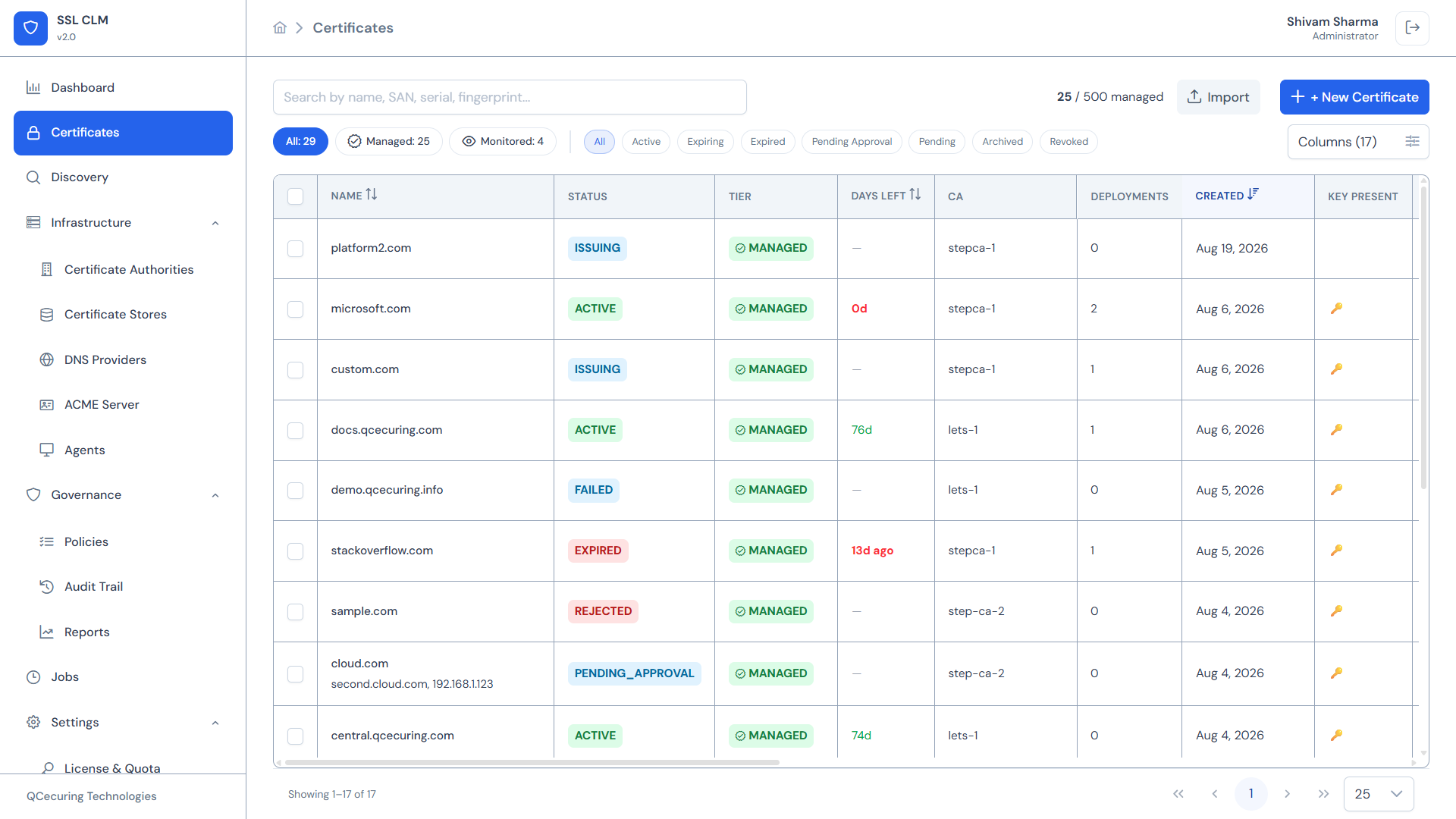
Section titled “Certificate Inventory”The inventory displays all certificates in a searchable, filterable data table.
Quota Display
Section titled “Quota Display”The top-right corner shows your license usage:
25 / 500 managedThis indicates how many certificates are in the Managed tier relative to your license limit.
Tier Tabs
Section titled “Tier Tabs”Certificates are organized into tiers:
| Tab | Description |
|---|---|
| All | Every certificate in the system regardless of tier |
| Managed | Certificates under active lifecycle management — counts against your license quota |
| Monitored | Certificates being tracked for visibility but not actively managed (e.g., discovered certificates) |
Managed certificates receive full lifecycle automation (renewal, deployment, alerting). Monitored certificates are tracked for expiration awareness only.
Status Filters
Section titled “Status Filters”Filter certificates by clicking status chips:
| Status | Meaning |
|---|---|
| Active | Valid and within its validity window |
| Expiring | Within the renewal threshold (approaching expiration) |
| Expired | Past its validity period |
| Pending Approval | Awaiting manual approval per policy |
| Pending | Issuance in progress |
| Issuing | Currently being issued by the CA |
| Archived | Superseded by a newer certificate, retained for audit |
| Revoked | Explicitly revoked |
| Failed | Issuance or renewal failed |
| Rejected | Approval request was rejected |
Table Columns
Section titled “Table Columns”The inventory table displays (configurable via the Columns button):
| Column | Description |
|---|---|
| Name | Certificate common name or friendly name |
| Status | Current lifecycle status with color-coded badge |
| Tier | Managed or Monitored |
| Days Left | Days until expiration (negative = expired) |
| CA | Issuing Certificate Authority name |
| Deployments | Number of active store deployments |
| Created | Date the certificate was added to inventory |
| Key Present | Whether the private key is stored in the platform |
Sorting & Search
Section titled “Sorting & Search”- Search bar — Find certificates by common name, SAN, serial number, or fingerprint
- Column sorting — Click any column header to sort ascending/descending
- Pagination — Navigate through large inventories
Certificate Detail View
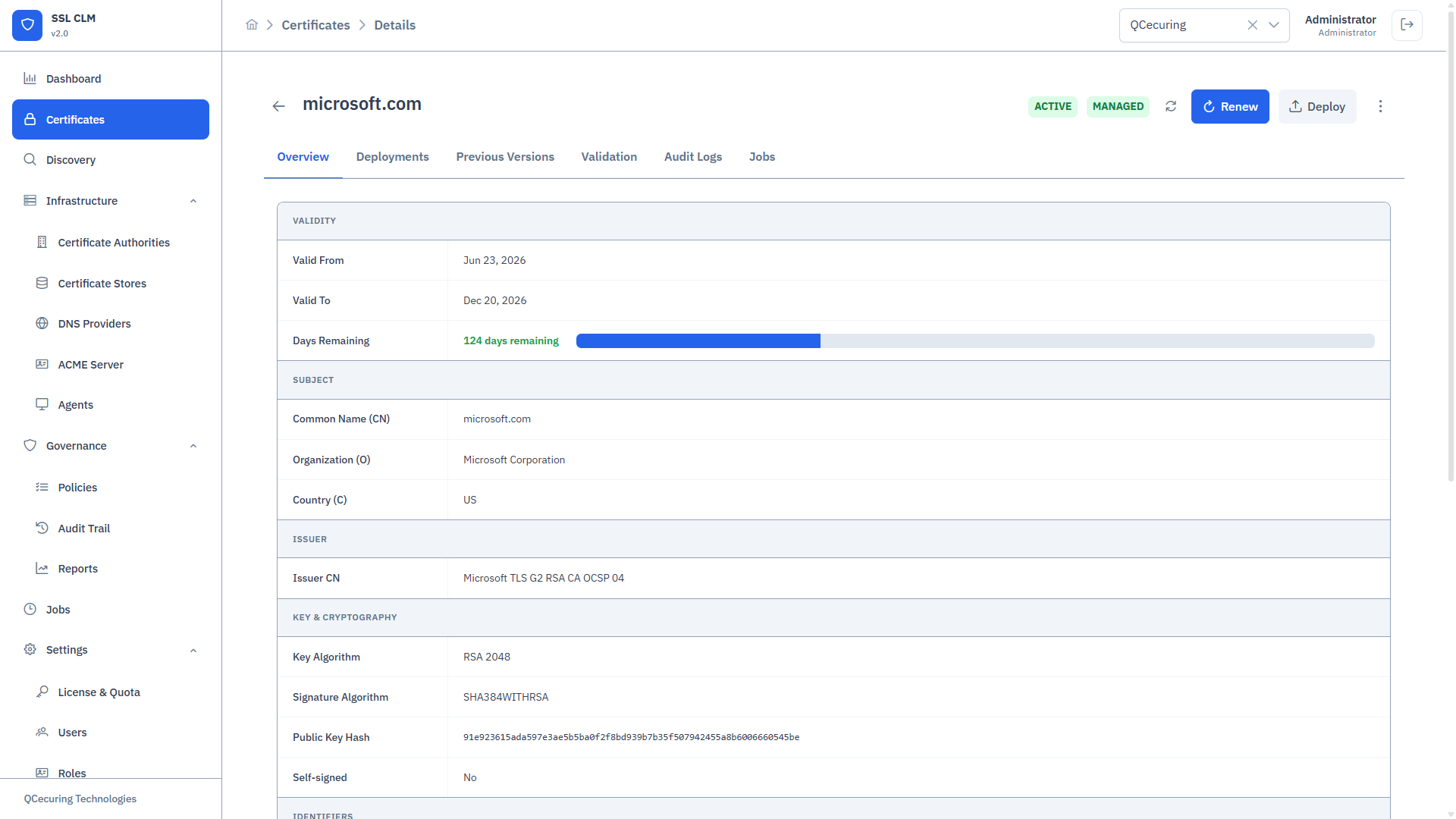
Section titled “Certificate Detail View”Click any certificate row to open the full detail view.
Overview Tab
Section titled “Overview Tab”- Subject — Common Name, Organization, OU, Country, State, Locality, Email
- Issuer — CA name, issuer DN
- Validity — Valid From, Valid To, Days Remaining
- Serial Number — Hex serial
- Fingerprint — SHA-256 fingerprint
- Status — Current lifecycle state
Key Information
Section titled “Key Information”- Algorithm — RSA or EC (ECDSA)
- Key Size — 2048, 3072, 4096 (RSA) or 256, 384, 521 (EC)
- Signature Algorithm — e.g., SHA256withRSA, SHA384withECDSA
- Key Present — Whether private key is stored
Subject Alternative Names (SANs)
Section titled “Subject Alternative Names (SANs)”Full list of DNS names and IP addresses covered by the certificate.
Deployments
Section titled “Deployments”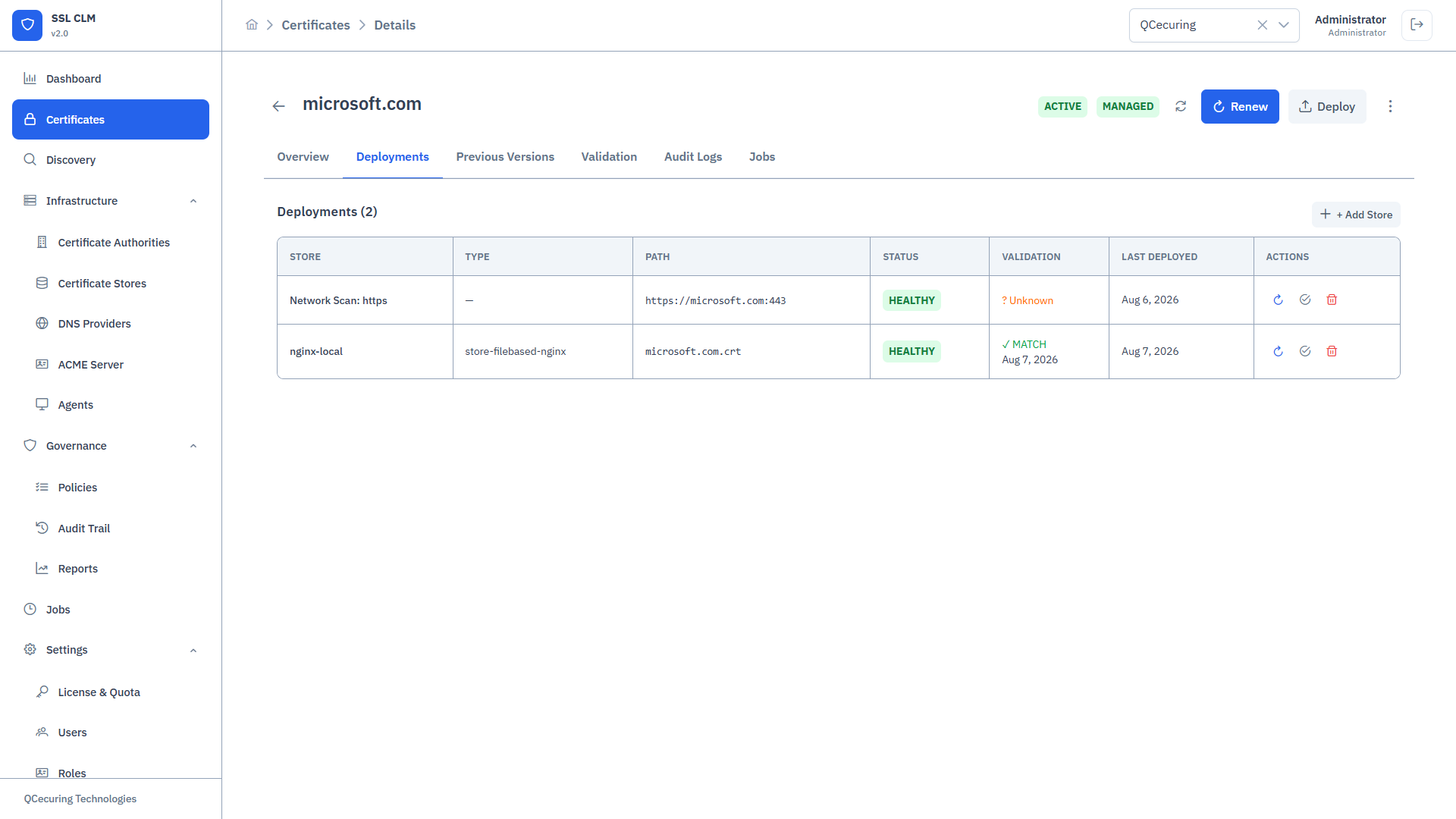
Lists all stores where this certificate is deployed:
- Store name and type
- Deployment status
- Last sync time
- Actions: Remove deployment, re-deploy
Renewal History
Section titled “Renewal History”Audit trail of all renewals for this certificate identity:
- Renewal date
- Previous certificate serial
- New certificate serial
- Trigger (manual / auto / policy)
Actions
Section titled “Actions”From the detail view:
- Renew — Trigger immediate renewal
- Deploy — Add to a certificate store
- Revoke — Revoke the certificate at the CA
- Download — Download certificate (PEM, DER, PKCS#12)
- Export Key — Export private key (requires
certificate:export-keypermission) - Archive — Move to archived state
Creating a New Certificate
Section titled “Creating a New Certificate”Click + New Certificate to open the unified enrollment workflow.
Enrollment Modes
Section titled “Enrollment Modes”SSL-CLM v2 supports 5 enrollment modes from a single page:
1. Issue from CA
Section titled “1. Issue from CA”Full automated lifecycle: generate key pair + CSR on the server, submit to an integrated CA, receive the issued certificate.
Required fields:
- Certificate Authority (select from configured CAs)
- Common Name
- Subject Alternative Names (optional)
- Key Algorithm: RSA or EC (ECDSA)
- Key Size: 2048 / 3072 / 4096 (RSA) or P-256 / P-384 / P-521 (EC)
- Validity (days)
- Template (if the CA supports templates)
Optional:
- Auto-Renew: Enable + days-before-expiry threshold
- Auto-Deploy: Select target stores
- Generate PFX: Create PKCS#12 bundle with password
Flow:
- Platform generates key pair and CSR
- CSR submitted to selected CA
- CA issues certificate (may require approval if policy enforces it)
- Certificate stored in inventory
- Auto-deployed to configured stores (if enabled)
2. Submit Existing CSR
Section titled “2. Submit Existing CSR”Submit a PEM-encoded CSR that was generated externally (e.g., by the application, openssl, or another tool).
Required fields:
- Certificate Authority
- CSR PEM (paste into text area)
CSR Preview: As you paste, the platform parses and displays:
- Subject (CN, O, OU, etc.)
- SANs detected
- Key algorithm and size
- Any parsing errors
Flow:
- CSR validated and parsed
- Submitted to selected CA
- Certificate issued and stored
- Private key is NOT stored (it remains with whoever generated the CSR)
3. Generate CSR Only
Section titled “3. Generate CSR Only”Generate a key pair and CSR locally in the browser. Download the CSR for submission to an external CA. The certificate will not be issued by SSL-CLM.
Required fields:
- Common Name
- Key Algorithm and Size
- SANs (optional)
- Subject fields (optional)
Output:
.csrfile (PEM-encoded).keyfile (PEM-encoded private key)- Optional: ZIP bundle of both files
Use case: When you need to submit a CSR to a CA that is not integrated with SSL-CLM.
4. Self-Signed
Section titled “4. Self-Signed”Generate a self-signed certificate for development, testing, or internal services.
Required fields:
- Common Name
- Key Algorithm and Size
- Validity (days)
- SANs (optional)
Output:
- Self-signed certificate stored in inventory
- Private key stored
- Marked as self-signed in metadata
Warning: Self-signed certificates are not trusted by browsers or clients without explicit trust configuration. Not recommended for production.
5. Plan for Later
Section titled “5. Plan for Later”Reserve a managed certificate identity without immediate issuance. Useful for planning ahead — you define what certificate you need, and issue it when ready.
Required fields:
- Certificate Authority
- Common Name
Result:
- Creates a certificate identity in “Pending” status
- No CSR or certificate is generated
- Can be issued later from the detail view
Policy Enforcement During Enrollment
Section titled “Policy Enforcement During Enrollment”When you submit a certificate request, the Policy Engine evaluates all active issuance policies:
- If the request violates a policy (e.g., key size too small, forbidden SAN pattern), the request is rejected with an error message.
- If the policy has
requireApprovalenabled, the certificate enters Pending Approval status and must be approved by a user with thecertificate:approvepermission. - If no policies match or all pass, the certificate is issued immediately.
Importing Certificates
Section titled “Importing Certificates”Click Import to upload existing certificates into inventory:
- Supported formats:
.pem,.crt,.cer,.der,.p12,.pfx - Optionally include private key
- Imported certificates are added to the Monitored tier by default
- Promote to Managed tier to enable lifecycle automation
Bulk Operations
Section titled “Bulk Operations”From the inventory table, select multiple certificates to:
- Bulk renew
- Bulk deploy to a store
- Bulk archive
- Export as CSV
Lifecycle State Machine
Section titled “Lifecycle State Machine”PLAN_FOR_LATER → PENDING → ISSUING → ACTIVE → EXPIRING → EXPIRED ↓ ↓ FAILED RENEWED → ACTIVE ↓ ARCHIVED
ACTIVE → REVOKEDPENDING → PENDING_APPROVAL → ACTIVE (approved) or REJECTED (denied)Related Pages
Section titled “Related Pages”- Certificate Authorities — Manage CAs for issuance
- Certificate Stores — Deployment targets
- Policies — Issuance and deployment governance
- Jobs — Track issuance and renewal jobs