ACME Server
ACME Server
Section titled “ACME Server”SSL-CLM includes a built-in ACME server that exposes RFC 8555-compliant endpoints. This allows any standard ACME client (certbot, acme.sh, win-acme, Caddy, Traefik, etc.) to request certificates from your internal Certificate Authorities using the ACME protocol.
Navigation: Sidebar → Infrastructure → ACME Server
Why an ACME Server?
Section titled “Why an ACME Server?”Organizations often need:
- Developers to request certificates without accessing the SSL-CLM UI
- CI/CD pipelines to auto-provision certificates
- Web servers with built-in ACME support (Caddy, Traefik) to use internal CAs
- A standard protocol interface to private PKI
The built-in ACME server bridges this gap — it exposes your internal CAs via the industry-standard ACME protocol.
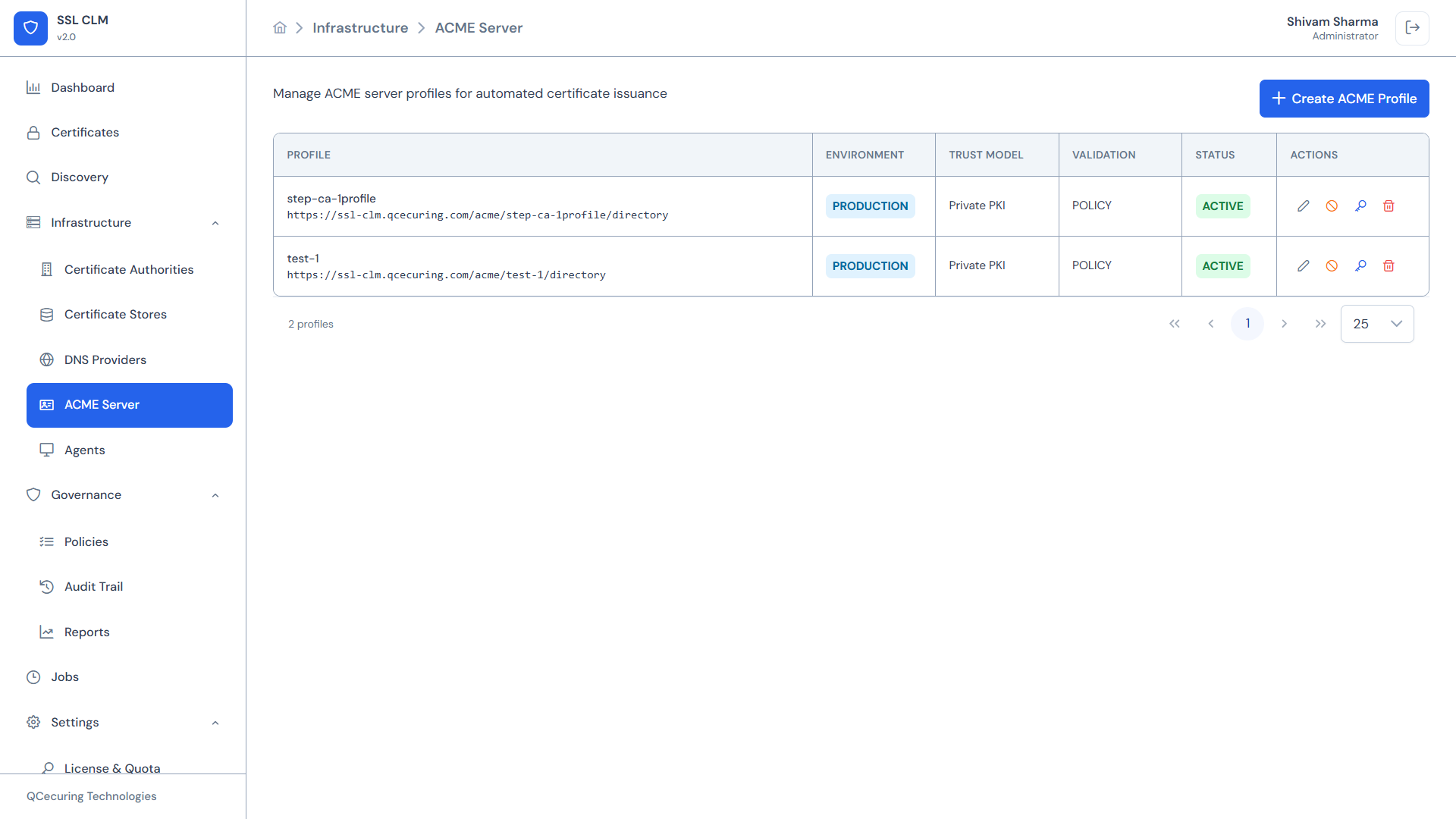
ACME Profile Table
Section titled “ACME Profile Table”The main view lists all configured ACME profiles:
| Column | Description |
|---|---|
| Name | Profile display name |
| Directory URL | The ACME directory endpoint URL |
| Environment | PRODUCTION or SANDBOX |
| Trust Model | PRIVATE_PKI or PUBLIC_CA |
| Validation | Validation mode: POLICY or CA_ENFORCED (derived from Trust Model) |
| Status | ACTIVE or DISABLED |
| Actions | Edit, Disable, View URL, Delete |
ACME Profile Configuration
Section titled “ACME Profile Configuration”Fields
Section titled “Fields”| Field | Description | Options |
|---|---|---|
| Name | Display name for the profile | Free text |
| Profile ID | URL-safe identifier (used in directory URL) | e.g., internal-pki |
| Environment | Deployment context | PRODUCTION, SANDBOX |
| Trust Model | Type of PKI trust | PRIVATE_PKI, PUBLIC_CA |
| CA Integration | Which configured CA backs this profile | Select from configured CAs |
| Validation Mode | Derived automatically from Trust Model | POLICY (PRIVATE_PKI), CA_ENFORCED (PUBLIC_CA) |
Note: Validation Mode is set automatically from the Trust Model — you do not choose it directly.
PRIVATE_PKImaps toPOLICY(no challenge),PUBLIC_CAmaps toCA_ENFORCED(the backing CA enforces validation).
Policy Section
Section titled “Policy Section”Each ACME profile defines what certificates it will issue:
| Field | Description | Example |
|---|---|---|
| Allowed Key Types | Which key algorithms are accepted | RSA, ECDSA |
| Allowed Key Sizes | Which key sizes are accepted | 2048, 3072, 4096 |
| Allowed SAN Types | Which SAN types are accepted | DNS, IP |
| Max Certificate Validity (days) | Maximum validity for issued certs | 365 |
| Auto-Renewal Allowed | Whether ACME renewal is permitted | Yes / No |
External Account Binding (EAB)
Section titled “External Account Binding (EAB)”EAB is always required for every profile. It ties an ACME account to a profile you authorized, so anonymous clients cannot register.
| Field | Description |
|---|---|
| EAB KID | Key identifier for the external account |
| EAB HMAC Key | Shared secret for account binding |
Credentials are generated when the profile is created (and shown once). ACME clients must supply both the --eab-kid and --eab-hmac-key during account registration or the very first certonly run.
Creating an ACME Profile
Section titled “Creating an ACME Profile”- Click + Create ACME Profile
- Fill in the profile configuration:
- Name and Profile ID
- Select environment (Production / Sandbox)
- Select trust model (PRIVATE_PKI or PUBLIC_CA) — this also sets the validation mode automatically
- Choose the backing Certificate Authority
- Set policy constraints (key types, sizes, validity)
- Click Save
- Save the EAB credentials shown in the dialog — the HMAC secret is displayed only once. A ready-to-run certbot example is shown alongside them.
The system generates a Directory URL like:
https://ssl-clm.example.com/acme/internal-pki/directoryEnvironments
Section titled “Environments”| Environment | Purpose | Recommended Use |
|---|---|---|
| PRODUCTION | Live certificates for production workloads | Real infrastructure |
| SANDBOX | Testing ACME client configuration without affecting production | CI/CD testing, client onboarding, dry runs |
Use a SANDBOX profile to test ACME client configurations before pointing clients at a PRODUCTION profile.
Trust Models
Section titled “Trust Models”| Model | Description | Validation Mode | Use Case |
|---|---|---|---|
| PRIVATE_PKI | Certificates issued from an internal CA (e.g., Smallstep/step-ca), trusted only within your organization | POLICY — no challenge; issuance controlled by EAB + policy | Internal services, microservices, dev/test |
| PUBLIC_CA | Certificates issued through a public/managed CA connector (e.g., DigiCert, or Let’s Encrypt via the ACME gateway) | CA_ENFORCED — the backing CA performs its own domain validation | Public-facing services |
Important: For a
PUBLIC_CAprofile backed by Let’s Encrypt, the backing CA validates the domain over the public internet (DNS-01 via a configured DNS provider). The domain must be real and publicly resolvable — local/internal names likemyapp.internal.corpcannot be validated by a public CA.
Validation Modes
Section titled “Validation Modes”Validation Mode is derived from the Trust Model — you do not set it directly.
| Mode | Set When Trust Model Is | How It Works |
|---|---|---|
| POLICY | PRIVATE_PKI | No ACME challenge. Authorizations are auto-approved and the certificate is issued immediately. Access is gated by EAB + issuance policy. Best for internal PKI where requestors are already authenticated. |
| CA_ENFORCED | PUBLIC_CA | The backing CA performs domain validation (e.g., Let’s Encrypt DNS-01 via a configured DNS provider). Requires the domain to be publicly resolvable. |
The ACME challenge type (DNS-01 vs HTTP-01) is a separate concept from Validation Mode. In
POLICYmode no challenge is used at all. Wildcard certificates from a public CA always require DNS-01.
Using with ACME Clients
Section titled “Using with ACME Clients”Certbot
Section titled “Certbot”A single certonly command registers the account (using the EAB credentials) and requests the certificate. Use the exact Directory URL shown on your ACME profile — the profile ID in the path selects the profile.
certbot certonly \ --server "https://ssl-clm.example.com/acme/internal-pki/directory" \ --standalone \ -d myapp.internal.corp \ --agree-tos \ -m admin@example.com \ --eab-kid "YOUR_KID" \ --eab-hmac-key "YOUR_HMAC_KEY"Notes:
--eab-kidand--eab-hmac-keycome from the ACME profile (shown once at creation). They are required.- If your SSL-CLM endpoint uses a self-signed or internal TLS certificate, add
--no-verify-ssl(or point certbot at your internal CA bundle). Do not use--no-verify-sslagainst a production, publicly-trusted endpoint. --standalonemakes certbot serve the HTTP-01 challenge itself on port 80. It is only relevant forCA_ENFORCED(public CA) profiles that use HTTP-01. ForPOLICY(private PKI) profiles no challenge is performed, so the flag is harmless but unused.
Where the certificate and key land: certbot generates the private key locally and writes the results to /etc/letsencrypt/live/<domain>/ (privkey.pem, cert.pem, chain.pem, fullchain.pem). The private key never leaves the client — SSL-CLM only receives the CSR and returns the signed certificate.
acme.sh
Section titled “acme.sh”# Register once with EAB, then issueacme.sh --register-account \ --server "https://ssl-clm.example.com/acme/internal-pki/directory" \ --eab-kid "YOUR_KID" \ --eab-hmac-key "YOUR_HMAC_KEY"
acme.sh --issue \ --server "https://ssl-clm.example.com/acme/internal-pki/directory" \ -d myapp.internal.corp \ --standaloneFor an internal/self-signed SSL-CLM endpoint, set
export HTTPS_INSECURE=1(acme.sh’s equivalent of skipping TLS verification) or configure your internal CA bundle.
win-acme (Windows)
Section titled “win-acme (Windows)”wacs.exe --baseuri https://ssl-clm.example.com/acme/internal-pki/directoryCaddy (automatic)
Section titled “Caddy (automatic)”myapp.internal.corp { tls { ca https://ssl-clm.example.com/acme/internal-pki/directory ca_root /path/to/internal-ca-root.pem } reverse_proxy localhost:8080}Traefik
Section titled “Traefik”certificatesResolvers: internal: acme: caServer: https://ssl-clm.example.com/acme/internal-pki/directory email: admin@example.com storage: /etc/traefik/acme.json eab: kid: YOUR_KID hmacEncoded: YOUR_HMAC_KEYACME Protocol Flow
Section titled “ACME Protocol Flow”1. Client → ACME Server: POST /acme/{profile}/new-account (register)2. Client → ACME Server: POST /acme/{profile}/new-order (request cert)3. ACME Server → Client: Challenge (DNS-01, HTTP-01, or POLICY auto-approve)4. Client completes challenge (if required)5. Client → ACME Server: POST /acme/{profile}/finalize (submit CSR)6. ACME Server → Backing CA: Issue certificate7. ACME Server → Client: Certificate + chainFor POLICY validation mode, steps 3–4 are skipped — the certificate is issued immediately based on the requestor’s ACME account authorization.
EAB Credential Management
Section titled “EAB Credential Management”External Account Binding provides authenticated ACME access:
- Generate EAB credentials from the ACME profile detail view
- Credentials consist of a
kid(key ID) andhmacKey(shared secret) - Distribute credentials securely to authorized ACME clients
- Credentials can be rotated periodically for security
- Revoke compromised credentials to block unauthorized issuance
Status Management
Section titled “Status Management”| Action | Effect |
|---|---|
| Disable | Profile stops accepting new ACME requests. Existing certs remain valid. |
| Enable | Profile resumes accepting requests. |
| Delete | Profile is permanently removed. Directory URL stops responding. |
Monitoring
Section titled “Monitoring”ACME operations are tracked in:
- Audit Trail — Account registrations, orders, and issuances are logged (category
ACME_PROFILE) - Certificates — Every ACME-issued certificate is added to the certificate inventory, linked to a certificate identity, showing its issuing CA and the ACME profile in its metadata
Why ACME-issued certs are MONITORED
Section titled “Why ACME-issued certs are MONITORED”Certificates obtained by an ACME client (certbot, acme.sh, etc.) appear in the inventory with the MONITORED tier, not MANAGED. This is intentional and matches industry practice:
- The ACME client holds the private key and drives its own renewal (it re-requests the certificate from SSL-CLM on its own schedule).
- SSL-CLM therefore observes and tracks these certificates (inventory, expiry alerts, ownership, audit) but does not drive their renewal or deployment — which is what MANAGED implies.
Certificates that SSL-CLM issues and controls end-to-end (where it holds the key and drives renewal + deployment) are the ones treated as MANAGED.
Related Pages
Section titled “Related Pages”- Certificate Authorities — CAs that back ACME profiles
- DNS Providers — Required for DNS-01 challenges
- Policies — Issuance policies apply to ACME-issued certs too
- Certificates — ACME-issued certs appear here