Audit Trail
Audit Trail
Section titled “Audit Trail”The Audit Trail provides a tamper-resistant, immutable record of every action performed in the SSL-CLM platform — by users, agents, and automated system processes.
Navigation: Sidebar → Governance → Audit Trail
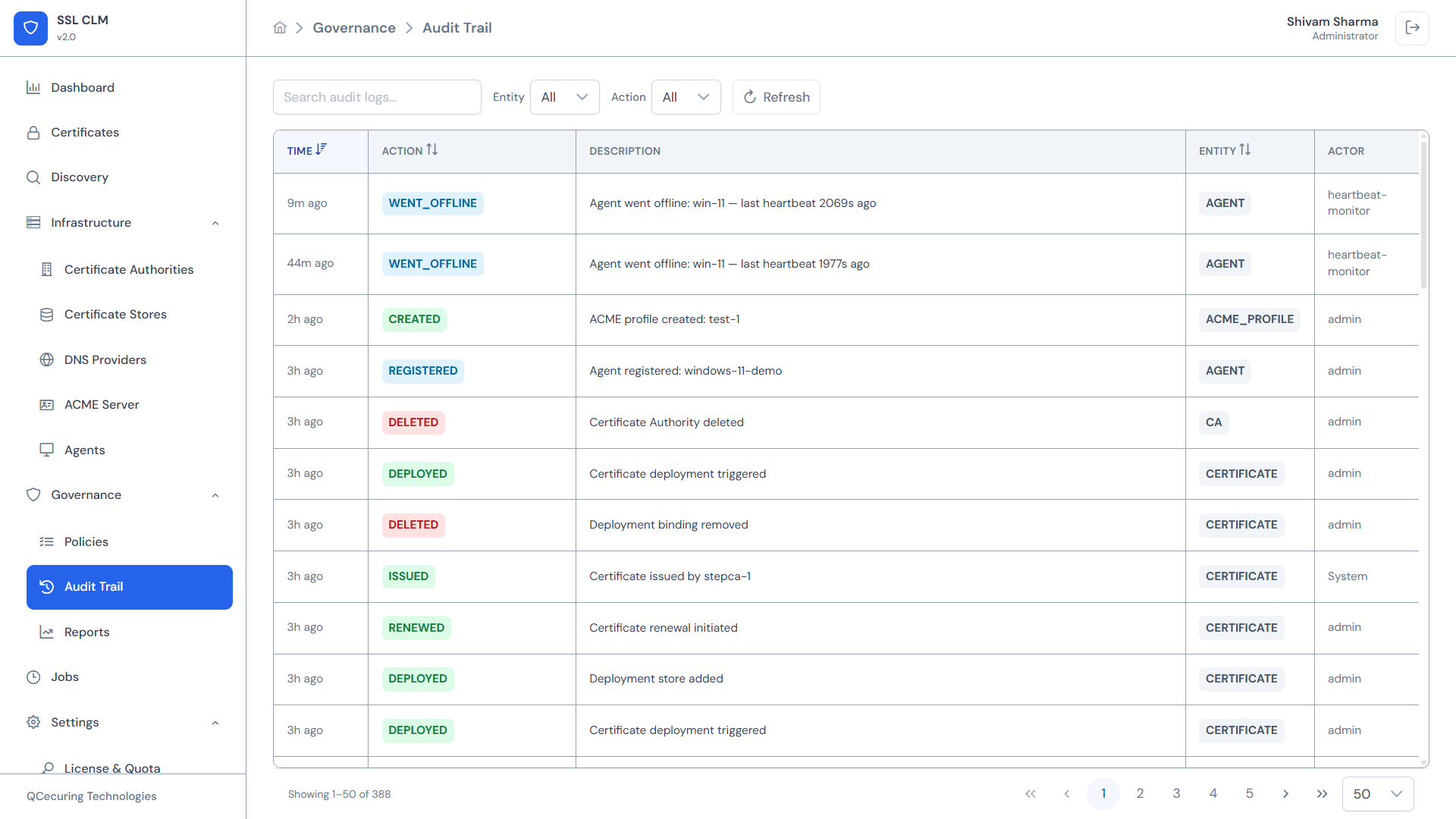
Audit Log Table
Section titled “Audit Log Table”The main view displays audit entries in reverse chronological order:
| Column | Description |
|---|---|
| Time | Relative timestamp (e.g., “3h ago”, “2d ago”) with exact time on hover |
| Action | Event type as a color-coded badge |
| Description | Human-readable detail of what happened |
| Entity | Resource type affected (e.g., CERTIFICATE, CA, AGENT) |
| Actor | Who performed the action — username or system identifier |
Action Types
Section titled “Action Types”| Action | Color | Meaning |
|---|---|---|
| CREATED | Blue | Resource was created |
| ISSUED | Green | Certificate was issued |
| RENEWED | Green | Certificate was renewed |
| DEPLOYED | Teal | Certificate was deployed to a store |
| REVOKED | Orange | Certificate was revoked |
| DELETED | Red | Resource was deleted |
| REGISTERED | Blue | Agent was registered |
| WENT_OFFLINE | Red | Agent stopped reporting |
| REJECTED | Red | Approval request was rejected |
| APPROVED | Green | Approval request was approved |
| CONFIGURED | Blue | Settings were changed |
| DISABLED | Gray | Resource was disabled |
| FAILED | Red | Operation failed |
Entity Types
Section titled “Entity Types”| Entity | What It Covers |
|---|---|
| CERTIFICATE | Certificate lifecycle events (creation, issuance, renewal, revocation, deployment) |
| CA | Certificate Authority CRUD, health changes, sync operations |
| AGENT | Agent registration, status changes, job execution |
| STORE | Certificate store CRUD, deployment operations |
| ACME_PROFILE | ACME server profile creation, modification, deletion |
| POLICY | Policy CRUD, enable/disable events |
| USER | User CRUD, role assignments, login events |
| ROLE | Role CRUD, permission changes |
| TEAM | Team CRUD, member changes |
| DNS_PROVIDER | DNS provider CRUD, verification events |
| JOB | Job lifecycle events |
| SETTINGS | System setting changes |
Actors
Section titled “Actors”Each audit entry records who performed the action:
| Actor Type | Examples | Meaning |
|---|---|---|
| User | admin@example.com, john.doe | Human user performed the action via UI or API |
| System | System | Platform automated process (scheduler, auto-renewal) |
| Agent | AGENT:agent-id | Agent executed a job |
| heartbeat-monitor | heartbeat-monitor | System process that detects agent status changes |
Filtering
Section titled “Filtering”Search
Section titled “Search”Free-text search across all fields — description, entity, actor, action.
Entity Filter
Section titled “Entity Filter”Dropdown to filter by resource type:
- All Entities
- CERTIFICATE
- CA
- AGENT
- STORE
- ACME_PROFILE
- POLICY
- USER
- (etc.)
Action Filter
Section titled “Action Filter”Dropdown to filter by event type:
- All Actions
- CREATED
- ISSUED
- RENEWED
- DEPLOYED
- REVOKED
- DELETED
- (etc.)
Refresh
Section titled “Refresh”Click the refresh button to load the latest entries.
Audit Entry Detail
Section titled “Audit Entry Detail”Click any row to expand its full details:
| Field | Description |
|---|---|
| Log ID | Unique identifier for this audit entry |
| Timestamp | Exact ISO-8601 timestamp |
| Action | Event type |
| Entity Type | Resource type |
| Entity ID | Specific resource identifier |
| Actor Type | USER, SYSTEM, or AGENT |
| Actor ID | User email, system process name, or agent ID |
| Description | Full human-readable description |
| Details | Structured JSON payload with operation-specific data |
Details Payload Examples
Section titled “Details Payload Examples”Certificate Issued:
{ "certificateId": "cert-abc123", "commonName": "api.example.com", "caId": "ca-smallstep-1", "serialNumber": "1A2B3C4D", "validFrom": "2026-08-20T00:00:00Z", "validTo": "2027-08-20T00:00:00Z"}Agent Went Offline:
{ "agentId": "agent-xyz", "hostname": "web-server-01", "lastHeartbeat": "2026-08-20T10:30:00Z", "offlineSince": "2026-08-20T10:35:00Z"}Policy Violated:
{ "policyId": "policy-strict-1", "policyName": "Production Web Certificates", "violation": "Key size 1024 below minimum 2048", "requestedBy": "developer@example.com"}Immutability
Section titled “Immutability”Audit logs are:
- Append-only — Entries cannot be modified or deleted through the UI or API
- Tamper-resistant — Each entry is stored with integrity metadata
- Complete — Every state change across the platform is logged
- Retained indefinitely — No automatic purging (configurable retention in enterprise plans)
Compliance Use Cases
Section titled “Compliance Use Cases”| Requirement | How Audit Trail Helps |
|---|---|
| Who issued this certificate? | Filter by Entity=CERTIFICATE, Action=ISSUED |
| When was this CA last synced? | Filter by Entity=CA, look for CA_REFRESH events |
| Who approved this deployment? | Filter by Action=APPROVED, Entity=CERTIFICATE |
| Why did this agent go offline? | Filter by Entity=AGENT, Action=WENT_OFFLINE |
| What settings changed recently? | Filter by Entity=SETTINGS, Action=CONFIGURED |
| Track all user login activity | Filter by Entity=USER, Action=AUTHENTICATED |
Export
Section titled “Export”Audit logs can be exported for external analysis or compliance reporting:
- Navigate to Governance → Reports
- Generate an Audit Report for a specific date range
- Export as CSV, PDF, or Excel
Related Pages
Section titled “Related Pages”- Jobs — Background operation tracking
- Reports — Generate audit reports
- Settings → Roles —
audit:readpermission required