Policies
Policies
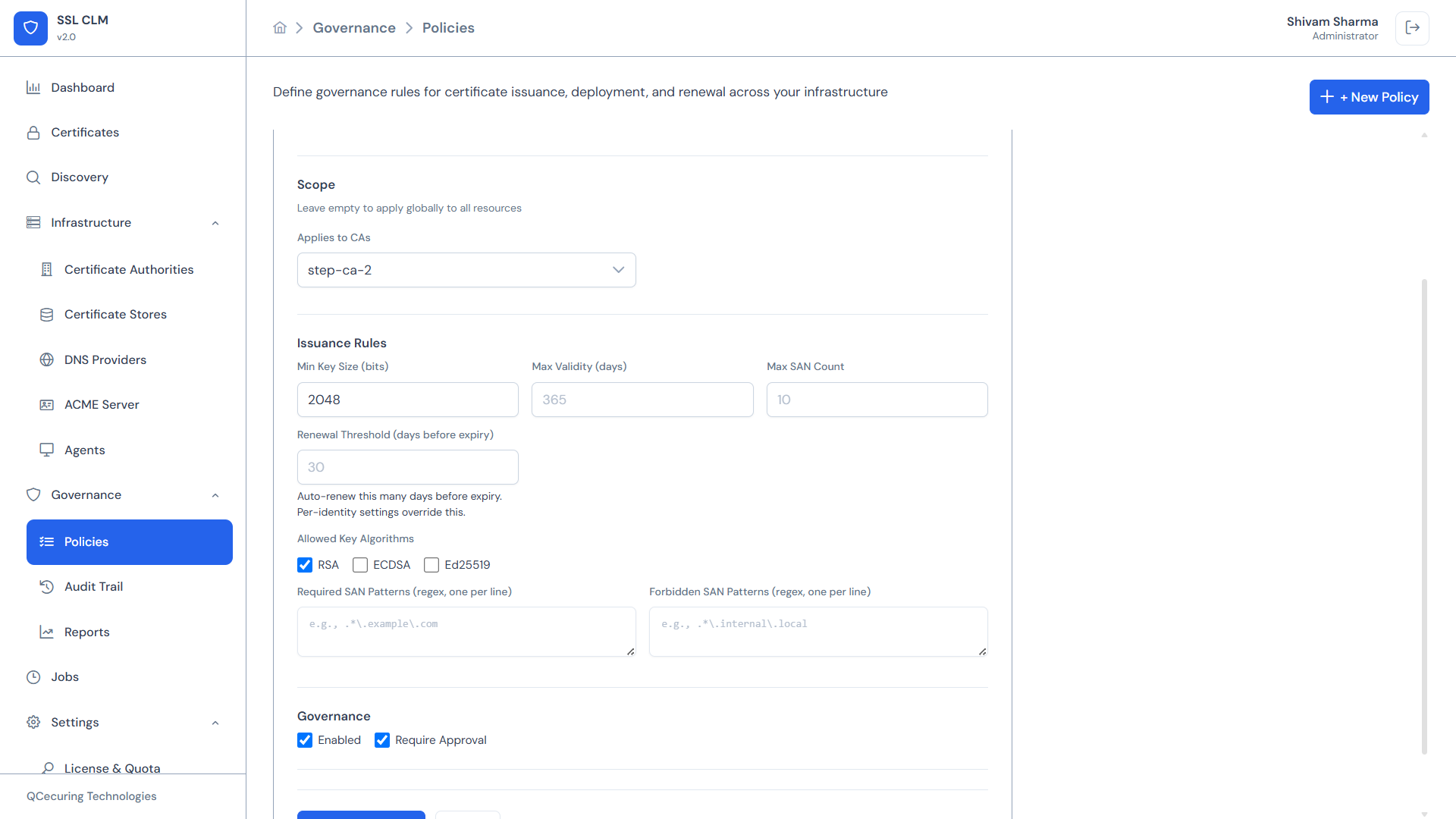
Section titled “Policies”Policies define governance rules that control how certificates are issued and deployed across your infrastructure. They enforce organizational cryptographic standards, trigger approval workflows, and prevent non-compliant operations.
Navigation: Sidebar → Governance → Policies
Policy Types
Section titled “Policy Types”SSL-CLM v2 supports two policy types:
| Type | Controls | Evaluated During |
|---|---|---|
| Issuance Policy | Certificate creation rules | Enrollment, renewal, CSR submission |
| Deployment Policy | Certificate deployment rules | Store deployment operations |
Both types support enabling/disabling, CA/store scoping, and approval workflow triggers.
Issuance Policies
Section titled “Issuance Policies”Issuance policies control what certificates can be created and how.
Configuration Fields
Section titled “Configuration Fields”| Field | Type | Description |
|---|---|---|
| Name | Text | Policy display name |
| Description | Text | Purpose description |
| Enabled | Toggle | Whether the policy is active |
| CA Scope | Multi-select | Limit to specific CAs (empty = all CAs) |
| Min Key Size | Number | Minimum allowed key size in bits (e.g., 2048) |
| Max Validity Days | Number | Maximum certificate validity period (e.g., 365) |
| Max SAN Count | Number | Maximum number of Subject Alternative Names (e.g., 10) |
| Renewal Threshold | Number | Days before expiry to trigger auto-renewal (e.g., 30) |
| Allowed Key Algorithms | Checkboxes | RSA, ECDSA, Ed25519 — at least one must be checked |
| Required SAN Patterns | Text (one per line) | Regex patterns that SANs MUST match (e.g., .*\.example\.com$) |
| Forbidden SAN Patterns | Text (one per line) | Regex patterns that SANs MUST NOT match (e.g., .*\.test\..*) |
| Require Approval | Toggle | If enabled, matching certificate requests go to Pending Approval |
| Approval Roles | Multi-select | Which roles can approve (if approval required) |
Evaluation Logic
Section titled “Evaluation Logic”When a certificate request is submitted:
- All enabled issuance policies are evaluated
- If the request’s CA matches a policy’s CA scope (or scope is empty/global):
- Key algorithm is checked against
allowedKeyAlgorithms - Key size is checked against
minKeySize - Validity period is checked against
maxValidityDays - SAN count is checked against
maxSanCount - Each SAN is validated against
requiredSanPatternsandforbiddenSanPatterns
- Key algorithm is checked against
- If any constraint fails → request is rejected with an error message
- If
requireApprovalis true → request enters Pending Approval status - If all constraints pass and no approval required → certificate is issued
Example: Production Web Certificate Policy
Section titled “Example: Production Web Certificate Policy”Name: Production Web CertificatesEnabled: YesCA Scope: [Production CA, Let's Encrypt]Min Key Size: 2048Max Validity Days: 397Max SAN Count: 25Allowed Key Algorithms: [RSA, ECDSA]Required SAN Patterns: .*\.mycompany\.com$Forbidden SAN Patterns: .*\.test\..* | .*\.local$Renewal Threshold: 30 daysRequire Approval: NoExample: High-Security Internal PKI Policy
Section titled “Example: High-Security Internal PKI Policy”Name: Internal Services - StrictEnabled: YesCA Scope: [Internal Smallstep CA]Min Key Size: 4096Max Validity Days: 90Max SAN Count: 5Allowed Key Algorithms: [ECDSA]Required SAN Patterns: .*\.internal\.corp$Forbidden SAN Patterns: (none)Renewal Threshold: 14 daysRequire Approval: YesApproval Roles: [PKI Manager, Security Reviewer]Deployment Policies
Section titled “Deployment Policies”Deployment policies control when and how certificates are pushed to stores.
Configuration Fields
Section titled “Configuration Fields”| Field | Type | Description |
|---|---|---|
| Name | Text | Policy display name |
| Description | Text | Purpose description |
| Enabled | Toggle | Whether the policy is active |
| Store Scope | Multi-select | Limit to specific stores (empty = all stores) |
| CA Scope | Multi-select | Only apply to certs from specific CAs |
| SAN Patterns | Text (one per line) | Only apply to certs matching these SAN patterns |
| Require Approval | Toggle | Manual approval before deployment |
| Approval Roles | Multi-select | Which roles can approve |
| Auto-Backup | Toggle | Backup existing certificate before deployment |
| Auto-Validate | Toggle | Run validation checks after deployment |
| Max Concurrent Deployments | Number | Limit simultaneous deployments (e.g., 5) |
| Allowed Windows | List | Time windows when deployment is permitted |
Deployment Windows
Section titled “Deployment Windows”Maintenance windows restrict when deployments can occur:
| Field | Description | Example |
|---|---|---|
| Day of Week | Which day | MONDAY, TUESDAY, …, SUNDAY |
| Start Time | Window start (24h) | 02:00 |
| End Time | Window end (24h) | 06:00 |
Multiple windows can be configured. If any window is active, deployment proceeds. If no window is active and windows are configured, deployment is blocked until the next window.
Evaluation Logic
Section titled “Evaluation Logic”When a deployment is requested:
- All enabled deployment policies are evaluated
- If the target store or certificate CA matches scope:
- Current time is checked against allowed windows
- Concurrent deployment count is checked
- If
requireApprovalis true → deployment queued for approval
- Before deployment:
- If
autoBackup→ existing certificate is backed up
- If
- After deployment:
- If
autoValidate→ validation checks execute automatically
- If
Example: Production Deployment Policy
Section titled “Example: Production Deployment Policy”Name: Production Deployment ControlsEnabled: YesStore Scope: [Production NGINX, Production IIS]Require Approval: YesApproval Roles: [Deploy Engineer, PKI Manager]Auto-Backup: YesAuto-Validate: YesMax Concurrent Deployments: 3Allowed Windows: - WEDNESDAY 02:00–06:00 - SATURDAY 00:00–08:00Creating a Policy
Section titled “Creating a Policy”- Navigate to Governance → Policies
- Click + New Policy
- Select policy type:
- Issuance — controls certificate creation
- Deployment — controls store deployment
- Fill in the form fields appropriate to the selected type
- Set scope (CAs, stores, or leave empty for global)
- Configure approval workflow if needed
- Enable the policy
- Click Save
Policy Table View
Section titled “Policy Table View”The Policies page displays all policies (both types) in a unified table:
| Column | Description |
|---|---|
| Name | Policy name |
| Type | Issuance or Deployment (color-coded badge) |
| Enabled | Toggle switch — can enable/disable inline |
| Scope | CA or Store names (or “Global”) |
| Approval | Whether approval is required |
| Actions | Edit, Delete |
Approval Workflows
Section titled “Approval Workflows”When a policy triggers approval:
- The certificate request or deployment enters Pending Approval status
- Users with the specified approval roles see the request in their queue
- The approver can:
- Approve — Operation proceeds
- Reject — Operation is cancelled with reason
- All approval/rejection decisions are logged in the Audit Trail
Certificate requests pending approval are visible in the Certificates page with a “Pending Approval” status filter.
Auto-Renewal with Policies
Section titled “Auto-Renewal with Policies”The renewDaysBefore (renewal threshold) field on issuance policies controls automatic renewal:
- When a managed certificate enters the renewal window (e.g., 30 days before expiry):
- The scheduler creates a renewal job
- The certificate is re-issued from the same CA with the same parameters
- If the policy requires approval, the renewal also requires approval
- After issuance, auto-deploy targets are re-deployed
Multiple policies can apply to the same certificate — the most restrictive threshold wins.
Policy Conflicts
Section titled “Policy Conflicts”When multiple policies apply:
- Constraints are cumulative — All applicable constraints must be satisfied
- Most restrictive wins — If one policy allows RSA+ECDSA and another allows only ECDSA, only ECDSA is permitted
- Any approval requirement triggers approval — If any matching policy requires approval, approval is required
Related Pages
Section titled “Related Pages”- Certificates — Where policies are enforced during enrollment
- Certificate Stores — Deployment policy targets
- Certificate Authorities — Issuance policy CA scoping
- Audit Trail — Approval decision logging
- Settings → Roles — Configure approval roles